Download Links
 Download Catalog Download Catalog |
Download Manual |
| Download Parameter Manual |
Wiring Details
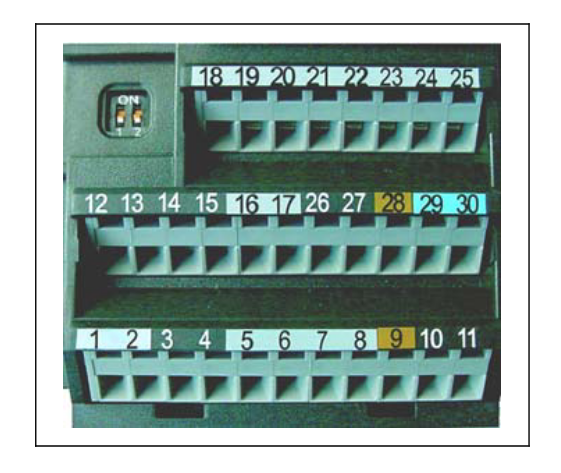
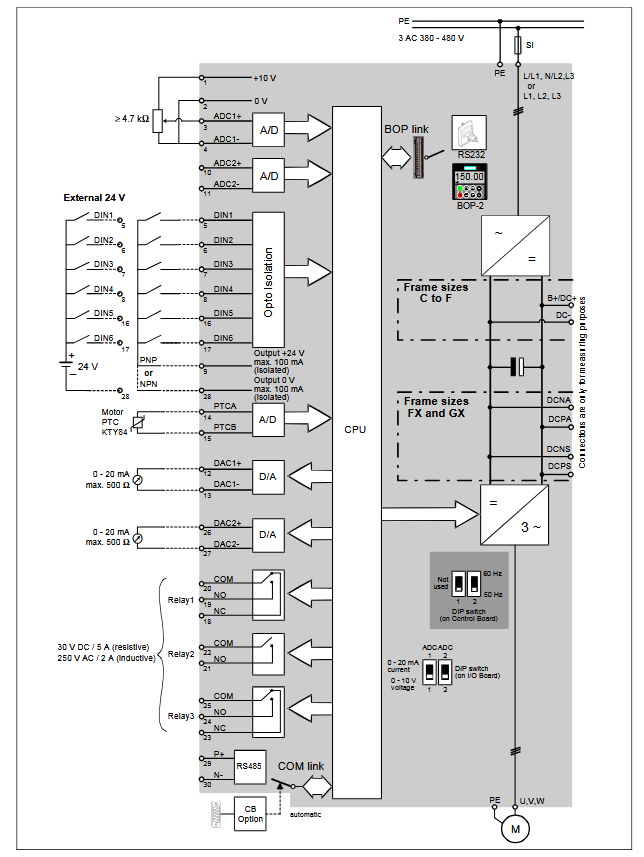
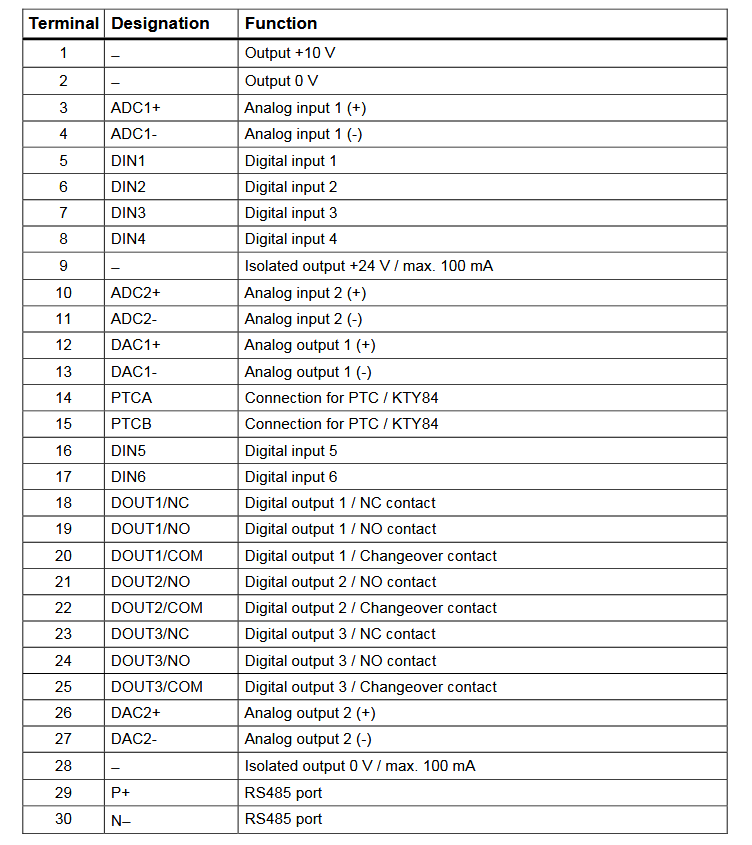
Below image show terminal details:
Faults & Alarms
Search from below list for MM430 drive faults & alarms:
| Fault Codes | Cause & Solution |
|---|---|
| F0001 OverCurrent | Cause: – Motor power (P0307) does not correspond to the inverter power (r0206) – Motor leads are too long – Motor lead short circuit – Earth faults Soultion: Check the following: – Motor power (P0307) must correspond to inverter power (r0206) – Cable length limits must not be exceeded – Motor cable and motor must have no short-circuits or earth faults – Motor parameters must match the motor in use – Value of stator resistance (P0350) must be correct – Motor must not be obstructed or overloaded – Increase the ramp time – Reduce the boost level (V/f control: P1311 & P1312, Vector control: P1610 & P1611) |
| F0002 OverVoltage | Cause: – DC-link controller disabled (P1240 = 0) – DC-link voltage (r0026) exceeds trip level (P2172) – Overvoltage can be caused either by too high main supply voltage or if motor is in regenerative mode. Regenerative mode can be caused by fast ramp downs or if the motor is driven from an active load. Soultion: Check the following: – Supply voltage (P0210) must lie within limits indicated on rating plate – DC-link voltage controller must be enabled (P1240) and parameterized properly – Ramp-down time (P1121) must match inertia of load – Required braking power must lie within specified limits NOTE: Higher inertia requires longer ramp times; otherwise, apply braking resistor. |
| F0003 UnderVoltage | Cause: – Main supply failed – Shock load outside specified limits Soultion: Check the following: – Supply voltage (P0210) must lie within limits indicated on rating plate – Supply must not be susceptible to temporary failures or voltage reductions – Enable kinetic buffering (P1240 = 2) |
| F0004 Inverter Over Temperature | Cause: – Ventilation inadequate – Ambient temperature is too high Soultion: Check the following: – Load conditions and duty cycle must be appropriate – Fan must turn when inverter is running – Pulse frequency (P1800) must be set to default value – Ambient temperature could be higher than specified for the inverter Additional meaning for MM440 Frame size FX & GX: Fault value = 1: Rectifier overtemperature = 2: Ambient overtemperature = 3: EBOX overtemperature |
| F0005 Inverter I2t | Cause: – Inverter overloaded – Duty cycle too demanding – Motor power (P0307) exceeds inverter power capability (r0206) Soultion: Check the following: – Load duty cycle must lie within specified limits – Motor power (P0307) must match inverter power (r0206) |
| F0011 Motor Over Temperature | Cause: Possible Causes Motor overloaded. Soultion: Check the following: – Load duty cycle must be correct – Motor nominal overtemperatures (P0626-P0628) must be correct – Motor temperature warning level (P0604) must match If P0601 = 0 or 1, check the following: – Check if name plate data are correct (if not perform quick commissioning) – Accurate equivalent circuit data can be found by performing motor identification (P1910=1) – Check if motor weight (P0344) is reasonable. Change if necessary – Via P0626, P0627, P0628 the standard overtemperatures can be changed, if the motor is not a Siemens standard motor If P0601 = 2, check the following: – Check if temperature shown in r0035 is reasonable – Check if the sensor is a KTY84 (other sensors are not supported) |
| F0012 Inverter temp. signal lost | Cause: Wire breakage of inverter temperature (heatsink) sensor. Solution: 1. Check drive control wiring. |
| F0015 Motor temperature signal lost | Cause: Open or short circuit of motor temperature sensor. If signal loss is detected, temperature monitoring switches over to monitoring with the motor thermal model. |
| F0020 Mains Phase Missing | Cause: Fault occurs if one of the three input phases are missed while the pulses are enabled and drive is loaded Soultion: 1. Check the input wiring of the mains phases. |
| F0021 Earth fault | Cause: Fault occurs if the sum of the phase currents is higher than 5 % of the nominal inverter current. NOTE: This fault only occurs on inverters that have 3 current sensors (Frame sizes D to F & FX, GX) |
| F0022 Powerstack fault | Cause: That hardware fault (r0947 = 22 and r0949 = 1) caused by the following events: (1) DC-link overcurrent = short circuit of IGBT (2) Short circuit of chopper (3) Earth fault (4) I/O board is not properly inserted – Frame sizes A to C (1),(2),(3),(4) – Frame sizes D to E (1),(2),(4) – Frame size F (2),(4) Since all these faults are assigned to one signal on the power stack, it is not possible to establish which one actually occurred. MM440 Frame size FX & GX: – UCE failure was detected, when r0947 = 22 and fault value r0949 = 12 or 13 or 14, depending on UCE. – I2C bus read out error, when r0947 = 22 and fault value r0949 = 21 (The power has to be switched OFF/ON). Soultion: 1. Check the I/O board. It has to be fully pressed home. |
| F0023 Output fault | Cause: One motor phase is disconnected. Solution: 1. Check motor cable. 2. This fault also comes when you run drive without motor. |
| F0030 Fan has failed | Cause: Fan no longer working. Soultion: – Fault cannot be masked while options module (AOP or BOP) is connected – Need a new fan |
| F0035 Auto restart after n | Cause: Auto restart attempts exceed value of P1211. |
| F0041 Motor Data Identification Failure | Cause: Motor data identification failed. Fault value = 0: Load missing 1: Current limit level reached during identification. 2: Identified stator resistance less than 0.1 % or greater than 100 %. 3: Identified rotor resistance less than 0.1 % or greater than 100 %. 4: Identified stator reactance less than 50 % and greater than 500 % 5: Identified main reactance less than 50 % and greater than 500 % 6: Identified rotor time constant less than 10 ms or greater than 5 s 7: Identified total leakage reactance less than 5 % and greater than 50 % 8: Identified stator leakage reactance less than 25 % and greater than 250 % 9: Identified rotor leakage inductance less than 25 % and greater than 250 % 20: Identified IGBT on-voltage less than 0.5 V or greater than 10 V 30: Current controller at voltage limit 40: Inconsistency of identified data set, at least one identification failed Percentage values based on the impedance Zb = Vmot,nom / sqrt(3) / Imot,nom Soultion: – Fault value = 0: Check that the motor is connected to the inverter – Fault value = 1-40: Check if motor data in P0304 to P0311 are correct – Check what type of motor wiring is required (star, delta). |
| F0042 Speed Control Optimisation Failure | Cause: Possible Causes Speed control optimisation (P1960) failed. Fault value = 0: Time out waiting for stable speed = 1: Inconsistent readings |
| F0051 Parameter EEPROM Fault | Cause: Read or write failure while saving non-volatile parameter Soultion: – Factory Reset and new parameterization – There is an hardware or software issue in drive. Need to repair or replace drive. |
| F0052 Power stack Fault | Cause: Read failure for power stack information or invalid data. Solution: There is an hardware or software issue in drive. Need to repair or replace drive. |
| F0053 IO EEPROM Fault | Cause: Read failure for IO EEPROM information or invalid data Solution: – Check data – Change IO board |
| F0054 Wrong IO Board | Cause: – Wrong IO board is connected – No ID detected on IO board, no data Solution: – Check data – Change IO board |
| F0060 Asic Timeout | Cause: Internal communications failure Solution: – If fault persists, change inverter. – There is an hardware or software issue in drive. Need to repair or replace drive. |
| F0070 CB setpoint fault | Cause: No setpoint values from CB (communication board) during telegram off time. Solution: 1. Check CB and communication partner. |
| F0071 USS (BOP-link) setpoint fault | Cause: No setpoint values from USS during telegram off time. Solution: 1. Check USS master. |
| F0072 USS (COMM link) setpoint fault | Cause: No setpoint values from USS during telegram off time Solution: 1. Check USS master. |
| F0080 ADC lost input signal | Cause: 1. Broken wire. 2. Signal out of limits. Solution: 1. Check drive control wiring. |
| F0085 External Fault | Cause: External fault triggered via for example terminal inputs. Solution: 1. Disable for example terminal input for fault trigger. |
| F0090 Encoder feedback loss | Cause: Signal from Encoder lost. Solution: – Check encoder fitted. If encoder not fitted, set P0400 = 0 and select SLVC mode (P1300 = 20 or 22) – If encoder fitted, check correct encoder selected (check encoder set-up in P0400). – Check connections between encoder and inverter – Check encoder not faulty (select P1300 = 0, run at fixed speed, check encoder feedback signal in r0061) – Increase encoder loss threshold in P0492 |
| F0101 Stack Overflow | Cause: Software error or processor failure. Solution: Run self test routines. |
| F0221 PID Feedback below min. value | Cause: PID Feedback below min. value P2268. Solution: – Change value of P2268 – Adjust feedback gain |
| F0222 PID Feedback above max. value | Cause: PID feedback above max. value P2267. Solution: – Change value of P2267 – Adjust feedback gain |
| F0450 BIST Tests Failure | Cause: Fault value = 1: Some power section tests have failed 2: Some control board tests have failed 4: Some functional tests have failed 8: Some IO board tests have failed (MM 420 only) 16: Internal RAM failed on power-up check Solution: There is an hardware or software issue in drive. Need to repair or replace drive. |
| F0452 Belt Failure Detected | Cause: Load conditions on motor indicate belt failure or mechanical fault. Solution: Check the following: 1. No breakage, seizure or obstruction of drive train. 2. If using an external speed sensor, check for correct function. Check parameters: P2192 (delay time for permitted deviation) 3. If using the torque envelope, check parameters: P2182 (threshold frequency f1) P2183 (threshold frequency f2) P2184 (threshold frequency f3) P2185 (upper torque threshold 1) P2186 (lower torque threshold 1) P2187 (upper torque threshold 2) P2188 (lower torque threshold 2) P2189 (upper torque threshold 3 P2190 (lower torque threshold 3) P2192 (delay time for permitted deviation) |
| A0501 Current Limit | Cause: – Motor power (P0307) does not correspond to the inverter power (P0206) – Motor leads are too long – Earth faults Solution: Check the following: – Motor power (P0307) must correspond to inverter power (r0206) – Cable length limits must not be exceeded – Motor cable and motor must have no short-circuits or earth faults – Motor parameters must match the motor in use – Value of stator resistance (P0350) must be correct – Motor must not be obstructed or overloaded – Increase the ramp-up-time. – Reduce the boost level (V/f control: P1311 & P1312, Vector control: P1610 & P1611) |
| A0502 Overvoltage limit | Cause: – Overvoltage limit is reached – This warning can occur during ramp down, if the dc-link controller is disabled (P1240 = 0) Solution: Check the following: – Supply voltage (P0210) must lie within limits indicated on rating plate – DC-link voltage controller must be enabled (P1240) and parameterized properly – Ramp-down time (P1121) must match inertia of load – Required braking power must lie within specified limits |
| A0503 UnderVoltage Limit | Cause: – Main supply failed – Main supply (P0210) and consequently DC-link voltage (r0026) below specified limit (P2172) Solution: – Supply voltage (P0210) must lie within limits indicated on rating plate – Supply must not be susceptible to temporary failures or voltage reductions |
| A0504 Inverter OverTemperature | Cause: Warning level of inverter heat-sink temperature (P0614) is exceeded, resulting in pulse frequency reduction and/or output frequency reduction (depending on parameterization in P0610) Solution: Check the following: – Load conditions and duty cycle must be appropriate – Fan must turn when inverter is running – Pulse frequency (P1800) must be set to default value – Ambient temperature could be higher than specified for the inverter |
| A0505 Inverter I2t | Cause: Warning level (P0294) exceeded, output frequency and/or pulse frequency will be reduced if parameterized (P0290). Solution: Check the following: – Load duty cycle must lie within specified limits – Motor power (P0307) must match inverter power (r0206) |
| A0511 Motor OverTemperature | Cause: – Motor overloaded – Load duty cycle too high Solution: Independently of the kind of temperature determination check the following: – Load duty cycle must be correct – Motor nominal overtemperatures (P0626-P0628) must be correct – Motor temperature warning level (P0604) must match If P0601 = 0 or 1, check the following: – Check if name plate data are correct (if not perform quick commissioning) – Accurate equivalent circuit data can be found by performing motor identification (P1910=1) – Check if motor weight (P0344) is reasonable. Change if necessary – Via P0626, P0627, P0628 the standard overtemperatures can be changed, if the motor is not a Siemens standard motor If P0601 = 2, check the following: – Check if temperature shown in r0035 is reasonable – Check if the sensor is a KTY84 (other sensors are not supported) |
| A0522 I2C read out timeout | Cause: The cyclic access to the UCE Values and powerstack temperatures via the I2C bus (MM440 Frame size FX & GX) is disturbed. |
| A0523 Output fault | Cause: One motor phase is disconnected. Solution: 1. Check motor cable. 2. This fault also comes when you run drive withut motor and rating of motor is small as compare to drive. |
| A0535 Braking Resistor Hot | Cause: Braking resistor hot. Solution: – Increase duty cycle P1237 – Increase ramp down time P1121 |
| A0541 Motor Data Identification Active | Cause: Motor data identification (P1910) selected or running. Solution: This is a informative warning. |
| A0542 Speed Control Optimisation Active | Cause: Speed Control Optimisation (P1960) is selected or running. |
| A0590 Encoder feeback loss warning | Cause: Possible Causes Signal from Encoder lost and Inverter has switched to sensorless vector control. Solution: Stop inverter and then – Check encoder fitted. If encoder not fitted, set P0400 = 0 and select SLVC mode (P1300 = 20 or 22) – If encoder fitted, check correct encoder selected (check encoder set-up in P0400). – Check connections between encoder and inverter – Check encoder not faulty (select P1300 = 0, run at fixed speed, check encoder feedback signal in r0061) – Increase encoder loss threshold in P0492 |
| A0600 RTOS Overrun Warning | |
| A0700 CB warning 1 | Cause: CB (communication board) specific. Solution: See CB user manual. |
| A0701 CB warning 2 | Cause: CB (communication board) specific. Solution: See CB user manual. |
| A0702 CB warning 3 | Cause: CB (communication board) specific. Solution: See CB user manual. |
| A0703 CB warning 4 | Cause: CB (communication board) specific. Solution: See CB user manual. |
| A0704 CB warning 5 | Cause: CB (communication board) specific. Solution: See CB user manual. |
| A0705 CB warning 6 | Cause: CB (communication board) specific. Solution: See CB user manual. |
| A0706 CB warning 7 | Cause: CB (communication board) specific. Solution: See CB user manual. |
| A0707 CB warning 8 | Cause: CB (communication board) specific. Solution: See CB user manual. |
| A0708 CB warning 9 | Cause: CB (communication board) specific. Solution: See CB user manual. |
| A0709 CB warning 10 | Cause: CB (communication board) specific. Solution: See CB user manual. |
| A0710 CB communication error | Cause: Communication with CB (communication board) is lost. Solution: 1. Check CB hardware. |
| A0711 CB configuration error | Cause: CB (communication board) reports a configuration error. Solution: 1. Check CB parameters. |
| A0910 Vdc-max controller de-activated | Cause: Vdc max controller has been de-activated, since controller is not capable of keeping DC-link voltage (r0026) within limits (P2172). – Occurs if main supply voltage (P0210) is permanently too high – Occurs if motor is driven by an active load, causing motor to go into regenerative mode – Occurs at very high load inertias, when ramping down Solution: Check the following: – Input voltage (P0210) must lie within range – Load must be match |
| A0911 Vdc-max controller active | Cause: Vdc max controller is active; so ramp-down times will be increased automatically to keep DC-link voltage (r0026) within limits (P2172). |
| A0912 Vdc-min controller active | Cause: Vdc min controller will be activated if DC-link voltage (r0026) falls below minimum level (P2172). The kinetic energy of the motor is used to buffer the DC-link voltage, thus causing deceleration of the drive! So short mains failures do not necessarily lead to an undervoltage trip. |
| A0920 ADC parameters not set properly | Cause: ADC parameters should not be set to identical values, since this would produce illogical results. Fault value = 0: Parameter settings for output identical 1: Parameter settings for input identical 2: Parameter settings for input do not correspond to ADC type |
| A0921 DAC parameters not set properly | Cause: DAC parameters should not be set to identical values, since this would produce illogical results. Fault value = 0: Parameter settings for output identical 1: Parameter settings for input identical 2: Parameter settings for output do not correspond to DAC type |
| A0922 No load applied to inverter | Cause: No Load is applied to the inverter. As a result, some functions may not work as under normal load conditions. Solution: This alarm also comes when you run drive without motor or rating of motor is small as compare to drive. |
| A0923 Both JOG Left and JOG Right are requested | Cause: Both JOG right and JOG left (P1055/P1056) have been requested. This freezes the RFG output frequency at its current value. |
| A0936 PID Autotuning Active | Cause: PID Autotuning (P2350) selected or running. Solution: This is a informative warning. |
| A0952 Belt Failure Warning | Cause: Load conditions on motor indicate belt failure or mechanical fault. Solution: Check the following: 1. No breakage, seizure or obstruction of drive train. 2. If using an external speed sensor, check for correct function. Check parameters: P2192 (delay time for permitted deviation) 3. If using the torque envelope, check parameters: P2182 (threshold frequency f1) P2183 (threshold frequency f2) P2184 (threshold frequency f3) P2185 (upper torque threshold 1) P2186 (lower torque threshold 1) P2187 (upper torque threshold 2) P2188 (lower torque threshold 2) P2189 (upper torque threshold 3) P2190 (lower torque threshold 3) P2192 (delay time for permitted deviation) |