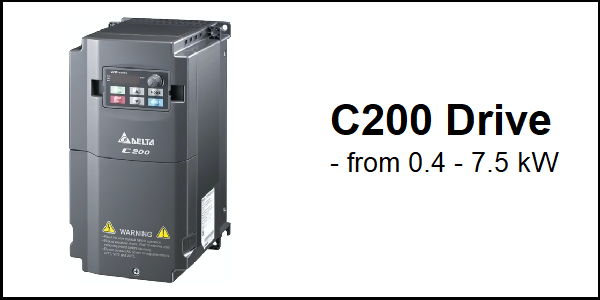
Download Links
 Download Catalog Download Catalog |
Download Manual |
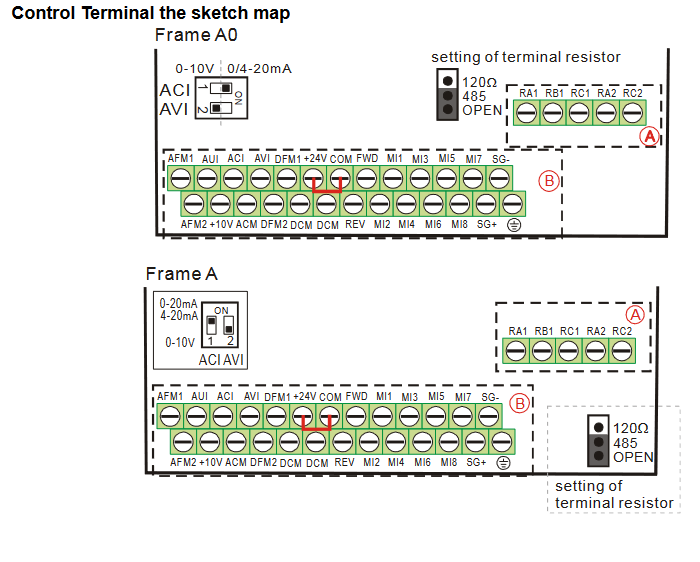
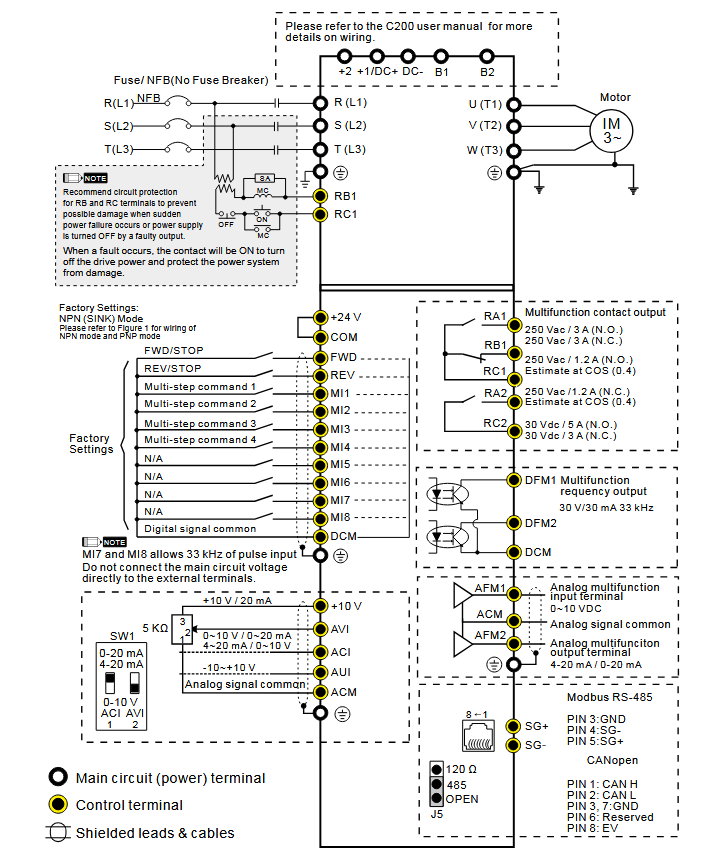
Wiring Details
Below image show terminal details:
Faults & Alarms
Search from below list for C200 drive faults & alarms:
| Fault Code | Cause & Solution |
|---|---|
| uC Under current warning | Meaning: Low current. Cause & Solution: 1. Broken motor cable – Exclude the connection issue of the motor and its load. 2. Improper setting for the low current protection – Set the proper settings for Pr.06-71, Pr.06-72 and Pr.06-73. 3. Low load Check the loading status. – Make sure the loading matches the motor capacity. 4. Warning setting parameter: Pr.06-73 – 0: No function – 1: Fault and coast to stop – 2: Fault and ramp to stop by the 2 nd deceleration time – 3: Warn and continue operation 5. Reset method: – Auto “Warning” occurs when Pr.06-73=3. The “Warning” automatically clears when the output current is larger than (Pr.06-71+0.1 A). – Manual “Error” occurs when Pr.06-73=1 and 2. You must reset manually. |
| c.c cc Warning | Meaning: cc (current clamp) hardware protection error when power is ON. Cause & Solution: 1. Hardware failure – Cycle the power. 2. After this same fault comes then there is an hardware issue in drive need to repair or replace drive. |
| Sw cc warning | Cause: Software CC occurred. Soultion: There is an hardware or software issue in drive. Need to repair or replace drive. |
| GFF Ground fault | Cause: When (one of) the output terminal(s) is grounded, short circuit current is more than 75% of AC motor drive rated current, the AC motor drive power module may be damaged. – When the drive detects grounding short circuit on the output terminals (U/V/W), the drive closes the gate of the output immediately, the motor runs freely, and the display shows a GFF error. NOTE: The short circuit protection is provided for AC motor drive protection, not for protection of the user. Soultion: 1. Check the wiring connections between the AC motor drive and motor for possible short circuits, also to ground. 2. Check whether the IGBT power module is damaged. 3. Check for possible poor insulation at the output line. |
| occ Short Circuit Fault | Cause: Short-circuit is detected between upper bridge and lower bridge of the IGBT module. Soultion: There is an hardware or software issue in drive. Need to repair or replace drive. |
| oL Over load Fault | Cause: Overload- The AC motor drive detects excessive drive output current. NOTE: The AC motor drive can withstand up to 150% of the rated current for a maximum of 60 seconds. Soultion: 1. Check whether the motor is overloaded. 2. Take the next higher power AC motor drive model. |
| uC Under Ampere Fault | Meaning: Low current detection. Fault treatment parameter Pr.06-73 – 0: No function – 1: Fault and coast to stop – 2: Fault and ramp to stop by the 2nd deceleration time – 3: Warn and continue operation Cause & Solution: 1. Motor cable disconnection – Troubleshoot the connection between the motor and the load. 2. Improper setting of low-current protection – Reset Pr.06-71, Pr.06-72 and Pr.06-73 to proper settings. 3. The load is too low – Check the load status. – Check if the motor capacity matches the load. |
| EF External fault | Cause: External Fault- This is programmable fault, comes when drive received external signal for external fault. Soultion: 1. Input EF (N.O.) on external terminal is closed to GND. Output U, V, W will be turned off. 2. Give RESET command after fault has been cleared. Fault treatment parameter Pr.07-20 – 0: Coast to stop – 1: Stop by the 1 st deceleration time – 2: Stop by the 2 nd deceleration time – 3: Stop by the 3 rd deceleration time – 4: Stop by the 4 th deceleration time – 5: System deceleration – 6: Automatic deceleration (Pr.01-46) |
| bb Base block Fault | Cause: Base Block. Soultion: 1. When the multi-function input terminals MI1 to MI8 are set to base block and the AC motor drive stops output. 2. Press RESET after fault has been cleared. |
| CE01 Communication error 1 warning | Cause & Solution: (CE1 – RS-485 Modbus illegal function code) 1. Incorrect communication command from upper unit: Check if the communication command is correct. 2. Malfunction caused by interference: Verify the wiring and grounding of the communication circuit. It is recommended to separate the communication circuit from the main circuit, or wire in 90 degree for effective anti-interference performance. 3. Different communication setting from the upper unit: Check if the setting for Pr.09-02 is the same as the setting for the upper unit. 4. Disconnection or bad connection of the cable: Check the cable and replace it if necessary. Reset method: “Warning” occurs when Pr.09-02=0 and the motor drive keeps running. The driven resets automatically when receiving the correct function code. |
| CE02 Communication error 2 warning | Cause & Solution: (CE2 – RS-485 Modbus illegal data address: When the input data address is incorrect) 1. Incorrect communication command from upper unit: Check if the communication command is correct. 2. Malfunction caused by interference: Verify the wiring and grounding of the communication circuit. It is recommended to separate the communication circuit from the main circuit, or wire in 90 degree for effective anti-interference performance. 3. Different communication setting from the upper unit: Check if the setting for Pr.09-02 is the same as the setting for the upper unit. 4. Disconnection or bad connection of the cable: Check the cable and replace it if necessary Reset method: “Warning” occurs when Pr.09-02=0 and the motor drive keeps running. The drive resets automatically when receiving the correct data address. |
| CE03 Communication error 3 warning | Cause & Solution: (CE3 – RS-485 Modbus illegal data value: When the length of communication data is too long) 1. Incorrect communication command from upper unit: Check if the communication command is correct. 2. Malfunction caused by interference: Verify the wiring and grounding of the communication circuit. It is recommended to separate the communication circuit from the main circuit, or wire in 90 degree for effective anti-interference performance. 3. Different communication setting from the upper unit: Check if the setting for Pr.09-02 is the same as the setting for the upper unit. 4. Disconnection or bad connection of the cable: Check the cable and replace it if necessary. Reset method: “Warning” occurs when Pr.09-02=0 and the motor drive keeps running. The drive resets automatically when receiving the correct communication data value. |
| CE04 Communication error 4 warning | Cause & Solution: (CE4 – RS-485 Modbus data is written to read-only address: When the data is written to read-only address.) 1. Incorrect communication command from upper unit: Check if the communication command is correct. 2. Malfunction caused by interference: Verify the wiring and grounding of the communication circuit. It is recommended to separate the communication circuit from the main circuit, or wire in 90 degree for effective anti-interference performance. 3. Different communication setting from the upper unit: Check if the setting for Pr.09-02 is the same as the setting for the upper unit. 4. Disconnection or bad connection of the cable: Check the cable and replace it if is necessary. Reset method: “Warning” occurs when Pr.09-02=0 and the motor drive keeps running. The drive resets automatically when receiving the correct written address of communication data. |
| CE10 Communication error 10 warning | Cause & Solution: (CE10- RS-485 Modbus transmission time-out: When the communication time exceeds the detection time of Pr.09-03 communication time-out) 1. The upper unit does not transmit the communication command within Pr.09-03 setting time: Check if the upper unit transmits the communication command within the setting time for Pr.09-03. 2. Malfunction caused by interference: Verify the wiring and grounding of the communication circuit. It is recommended to separate the communication circuit from the main circuit, or wire in 90 degree for effective anti-interference performance. 3. Different communication setting from the upper unit: Check if the setting for Pr.09-02 is the same as the setting for the upper unit. 4. Disconnection or bad connection of the cable: Check the cable and replace it if necessary. Reset method: “Warning” occurs when Pr.09-02=0 and the motor drive keeps running. The drive resets automatically when receiving the next communication packet. |
| CP10 Keypad time out Warning | Cause: Keypad transmission time-out. Soultion: 1. Check if the wiring for the communication is correct. 2. Check if there is any wrong with the keypad. |
| SE1 Save error 1 warning | Cause: Keypad COPY error 1: Keypad copy time-out- “SE1” warning occurs when the keypad does not transmit the COPY command to the drive, and does not transmit any data to the drive again in 10 ms at the time you copy the parameters to the drive. – Communication connection error – Keypad error – Control board error Solution 1. The causes of error are mostly communication problems between the keypad and control board. Potential causes include communication signal interference and the unacceptable communication command to the Slave. 2. Check if the error occurs randomly, or only occurs when copying certain parameters (the error displays on the upper right corner of the copy page) |
| SE2 Save error 2 warning | Keypad COPY error 2: parameter writing error- “SE2” warning occurs when writing the parameters incorrectly at the time you copy parameters to the drive. For example, you copy the new firmware version with added parameters to the drive with old firmware version. Cause: – Add new parameters to the new firmware version. – Malfunction caused by interference. Solution: 1. In this stage, the copied data has been transmitted to the Slave. 2. The Slave compares and processes the copied data, and then saves the data to the Data ROM. During the process, the data error (should be attribution error) may occur, or the data cannot be saved to EEPROM. At this time, the warning occurs. 3. It is suggested to check the status of Data ROM and remove the error causes first. 4. Verify the wiring and grounding of the main circuit, control circuit and the encoder for effective anti-interference performance. |
| oH1 IGBT over-heating warning | The AC motor drive detects IGBT overheating and exceeds the protection level of oH1 warning. (When Pr.06-15 is higher than the IGBT overheating protection level, the drive shows oH1 error without displaying oH1 warning.) – “oH1” warning occurs when IGBT temperature is higher than Pr.06-15 setting value. Cause & Solution: 1. Check if the ambient temperature or temperature inside the cabinet is too high, or if there is obstruction in the ventilation hole of the control cabinet. – Check the ambient temperature. – Regularly inspect the ventilation hole of the control cabinet. – Change the installed place if there are heating objects, such as brake resistors, in the surroundings. – Install/ add cooling fan or air conditioner to lower the temperature inside the cabinet. 2. Check if there is any obstruction on the heat sink or if the fan is running -Remove the obstruction or replace the cooling fan. 3. Insufficient ventilation space – Increase ventilation space of the drive. 4. Check if the drive matches the corresponded loading – Decrease loading. – Decrease the carrier wave. – Replace with a drive with larger capacity. 5. The drive has run 100% or more of the rated output for a long time. – Replace with a drive with larger capacity. |
| oH2 Over-heat 2 Warning | Cause: Heatsink overheating- Capacitance temperature exceeds cause heatsink overheating. Soultion: 1. Ensure that the ambient temperature falls within the specified temperature range. 2. Make sure heat sink is not obstructed. Check if the fan is operating 3. Check if there is enough ventilation clearance for AC motor drive. |
| PID PID feedback error warning | PID feedback loss (warning for analog feedback signal; works only when PID enables). – When the analog input is lower than 4 mA (only detects analog input 4–20 mA) Cause & Solution: 1. Loose or broken PID feedback wiring – Tighten the terminals again. – Replace with a new cable. 2. Feedback device malfunction – Replace with a new feedback device. 3. Hardware error – If the PID error still occurs after checking all the wiring, return to the factory for repair. 4. Warning setting parameter – Pr.08-09 – 0: Warn and continue operation – 1: Fault and ramp to stop – 2: Fault and coast to stop – 3: Warn and operate at last frequency 5. Reset method – Auto “Warning” occurs when Pr.08-09=0 or 3. The “Warning” automatically clears when the feedback signal is larger than 4 mA. – Manual “Error” occurs when Pr.08-09=1 or 2. You must reset manually. |
| AnL ACI analog signal loss warning | Analog input current loss (including all analog 4–20 mA signals) – When the analog input is lower than 4 mA (only detects analog input 4–20 mA) Cause & Solution: 1. Loose or broken ACI wiring – Tighten the terminals again. – Replace with a new cable. 2. External device error – Replace with a new device. 3. Hardware error – If the AnL error still occurs after checking all the wiring, return to the factory for repair. 4. Warning setting parameter: Pr.03-19 – 0: Disable – 1: Continue operation at the last frequency (warning, keypad displays ANL) – 2: Decelerate to 0 Hz (warning, keypad displays ANL) – 3: Stop immediately and display “ACE” 5. Reset method – Auto “Warning” occurs when Pr.03-19=1 or 2. The “Warning automatically clears when the analog input signal is larger than 4 mA. – Manual “Error” occurs when Pr.03-19=3. You must reset manually. |
| uC Under current warning | Meaning: Low current. Cause & Solution: 1. Broken motor cable – Exclude the connection issue of the motor and its load. 2. Improper setting for the low current protection – Set the proper settings for Pr.06-71, Pr.06-72 and Pr.06-73. 3. Low load Check the loading status. – Make sure the loading matches the motor capacity. 4. Warning setting parameter: Pr.06-73 – 0: No function – 1: Fault and coast to stop – 2: Fault and ramp to stop by the 2 nd deceleration time – 3: Warn and continue operation 5. Reset method: – Auto “Warning” occurs when Pr.06-73=3. The “Warning” automatically clears when the output current is larger than (Pr.06-71+0.1 A). – Manual “Error” occurs when Pr.06-73=1 and 2. You must reset manually. |
| AUE Auto-tune error warning | Meaning: Motor auto-tuning error. Cause & Solution: 1. Press “STOP” key during auto-tuning – Re-execute auto-tuning. 2. Incorrect motor capacity (too large or too small) and parameter setting – Check motor capacity and related parameters. – Set the correct parameters, that is Pr.01-01–Pr.01-02. – Set Pr.01-00 larger than the motor rated frequency. 3. Incorrect motor wiring – Check the wiring. 4. Motor shaft lock – Remove the cause of motor shaft lock. |
| PGFB PG FBK Warning | Cause: PG feedback error. Soultion: 1. Check if Pr.10-01 is not set to 0 when it is PG feedback control |
| PGL PG Loss Warning | Cause: PG feedback loss. Soultion: 1. Check the wiring of the PG feedback. |
| oSPd Over speed warning | Meaning: Over speed warning. – The encoder feedback speed > Pr.10-10. Cause & Solution: 1. Improper setting for Pr.10-25 FOC bandwidth for speed observer. – Decrease setting value for Pr.10-25. 2. Improper bandwidth setting for ASR speed controller. – Increase the bandwidth setting for ASR speed controller. 3. Incorrect motor parameter setting. – Reset motor parameter and run parameter tuning. 4. Malfunction caused by interference. – Verify the wiring of the control circuit, and the wiring/grounding of the main circuit to prevent interference. |
| dAvE Deviation Warning | Meaning: Over speed deviation warning. Cause & Solution: 1. Improper parameter setting for the slip error. – Reset proper value for Pr.10-13 and Pr.10-14. 2. Improper setting for ASR parameter and acceleration/ deceleration. – Reset ASR parameters. Set proper accel./ decel. time. 3. Accel./ Decel. time is too short. – Reset proper accel./ decel. time. 4. Motor locked. – Remove the causes of motor locked. 5. Mechanical brake is not released. – Check the action timing of the system. 6. Warning setting parameter Pr.10-15 – Encoder Stall and Slip Error Action =0 0: Warn and continue operation 7. Reset method: – “Warning” automatically clears when the drive stops |
| PHL Phase loss Warning | Meaning: Input phase loss warning. – One of the phases outputs less than Pr.06-47 Cause & Solution: 1. Phase loss of the input power – Verify the wiring of the main circuit. 2. Single phase power input on a three-phase model – Use the model with voltage that matches the power. 3. The power voltage has changed – If the power of main circuit works well, check if the MC of the main circuit is broken. Cycle the power after verifying the power is normal. If PHL still occurs, return to the factory for repair. 4. Loose wiring terminal of input power – Tighten the terminal screws with the torque listed in the user manual. 5. Check if the input cable of three-phase power is broken Make sure the wiring is correct. – Replace the broken part of the cable. 6. Unbalanced three-phase of the input power – Check the status of three-phase power. 7. Warning setting parameter Pr.06-45 – Output Phase Loss Detection Action (OPHL) =0 0: Warn and continue operation |
| ot1 Over-torque 1 Warning | Meaning: Over-torque 1 warning. Cause & Solution: 1. Incorrect parameter setting – Configure the settings for Pr.06-07 and Pr.06-08 again. 2. Mechanical error (e.g. mechanical lock due to over-torque) – Remove the causes of malfunction. 3. The load is too large – Decrease the loading. – Replace with a motor with larger capacity. 4. Accel./ Decel. time and working cycle is too short – Increase the setting values for Pr.01-12–01-19 (accel./ decel. time) 5. V/F voltage is too high – Adjust the V/F curve (Motor 1, Pr.01-01–01-08), especially the setting value for the mid-point voltage (if the mid-point voltage is set too small, the load capacity decreases at low-speed). 6. The motor capacity is too small – Replace with a motor with larger capacity. 7. Overload during low-speed operation – Decrease the loading during low-speed operation. – Increase the motor capacity. 8. The torque compensation is too large – Adjust the torque compensation value (Pr.07-26 torque compensation gain) until the output current decreases and the motor does not stall. 9. Improper parameter settings for the speed tracking function (including restart after momentary power loss and restart after fault) – Correct the parameter settings for speed tracking. – Start the speed tracking function. – Adjust the maximum current for Pr.07-09 speed tracking. 10. Incorrect parameter setting – Configure the settings for Pr.06-07 and Pr.06-08 again. 11. Warning setting parameter Pr.06-06 Over-torque Detection Selection (Motor 1) =1 or 3 – 0: No function – 1: Continue operation after over-torque detection during constant speed operation – 2: Stop after over-torque detection during constant speed operation – 3: Continue operation after over-torque detection during RUN – 4: Stop after over-torque detection during RUN |
| ot2 Over-torque 2 Warning | Meaning: Over-torque 2 warning. Cause & Solution: 1. Incorrect parameter setting – Configure the settings for Pr.06-10 and Pr.06-11 2. Mechanical error (e.g. mechanical lock due to over-torque) – Remove the causes of malfunction. 3. The load is too large – Decrease the loading. – Replace with a motor with larger capacity. 4. Accel./ Decel. time and working cycle is too short – Increase the setting values for Pr.01-12–01-19 (accel./ decel. time) 5. V/F voltage is too high – Adjust the V/F curve (Motor 2, Pr.01-35–01-42), especially the setting value for the mid-point voltage (if the mid-point voltage is set too small, the load capacity decreases at low-speed). 6. Warning setting parameter Pr.06-09 Over-torque Detection Selection (Motor 2) =1 or 3 – 0: No function – 1: Continue operation after over-torque detection during constant speed operation – 2: Stop after over-torque detection during constant speed operation – 3: Continue operation after over-torque detection during RUN – 4: Stop after over-torque detection during RUN |
| oH3 Motor over-heating Warning | Cause: Motor overheating – The AC motor drive detects that the internal temperature exceeds Pr.06-30 (PTC level) Soultion: 1. Make sure that the motor is not obstructed. 2. Ensure that the ambient temperature falls within the specified temperature range. 3. Take the next higher power AC motor drive model. |
| c.c cc Warning | Meaning: cc (current clamp) hardware protection error when power is ON. Cause & Solution: 1. Hardware failure – Cycle the power. 2. After this same fault comes then there is an hardware issue in drive need to repair or replace drive. |
| oSL Over slip warning | Meaning: Over slip warning- By using the maximum slip (Pr.10-29) as the base, when the drive outputs at constant speed, and the F>H or F – When the drive outputs at constant speed, and F>H or F Cause & Solution: 1. Check if the motor parameter is correct – Check the motor parameter. 2. The load is too large – Decrease the loading. 3. Check if the settings for Pr.07-29, Pr.07-30 and Pr.10-29 are properly set – Check the parameter settings for oSL protection. 4. Warning setting parameter Pr.07-31=0 Warning – 0: Warn and continue operation – 1: Fault and ramp to stop – 2: Fault and coast to stop – 3: No warning 5. Reset method: When Pr.07-31=0 and when the drive outputs at constant speed, and F>H or F |
| tUn Auto tuning Warning | Meaning: Parameter auto-tuning is processing. When running auto-tuning, the keypad displays “tUn”. – When running Pr.05-00 motor parameter auto-tuning, the keypad displays “tUn”. Cause & Solution: 1. The motor parameter is running auto-tuning – When the auto-tuning is finished, the warning automatically clears. 2. Reset method: When auto-tuning is finished and no error occurs, the warning automatically clears. |
| AHSP Auto/Hand STOP | Cause: Auto/Hand on switching STOP. |
| PGrE PG Ref input Error warning | Cause: PG Ref input error. |
| oPHL Output phase loss warning | Meaning: Output phase loss of the drive. This fault also comes when you run drive without motor or one of phase is not connected. Cause & Solution: 1. Unbalanced three-phase impedance of the motor Replace the motor. 2. Check if the wiring is incorrect Check the cable. – Replace the cable. 3. Check if the motor is a single-phase motor – Choose a three-phase motor. 4. Check if the current sensor is broken – Check if the control board cable is loose. If yes, reconnect the cable and run the drive to test. If the error still occurs, return to the factory for repair. – Check if the three-phase current is balanced with a current clamp meter. If the current is balanced and the oPHL error still shows on the display, then need to repair or replace drive. 5. Check if capacity of the drive is larger than the motor – Choose a drive’s capacity matches a motor’s. 6. Warning setting parameter Pr.06-45 – 0: Warn and continue operation – 1: Fault and ramp to stop – 2: Fault and coast to stop – 3: No warning |
| Sw cc warning | Cause: Software CC occurred. Soultion: There is an hardware or software issue in drive. Need to repair or replace drive. |
| SE3 Copy model error 3 warning | Meaning– Keypad COPY error 3: copy model error – “SE3” warning occurs when different drive identity codes are found during copying parameters. – Keypad copy between different power range drive Cause & Solution: 1. Keypad copy between different power range drives. – It is mainly to prevent parameter copies between different HP/models. |
| CGdn CANopen guarding time-out warning | Meaning: CANopen guarding time-out 1 – When CANopen Node Guarding detects that one of the slaves does not respond, the CGdn error displays. The upper unit sets the factor and time during configuration. Cause & Solution: 1. The guarding time is too short, or less detection times – Increase the guarding time (Index 100C) and detection times. 2. Malfunction caused by interference – Verify the wiring and grounding of the communication circuit. It is recommended to separate the communication circuit from the main circuit, or wire in 90 degree for effective anti-interference performance. – Make sure the communication circuit is wired in series. – Use CANopen cable or add terminating resistance. |
| CHbn CANopen heartbeat t-out warning | Meaning: CANopen heartbeat error- When CANopen Heartbeat detects that one of the slaves does not response, the CHbn error shows. The upper unit sets the confirming time of producer and consumer during configuration. Cause & Solution(Heartbeat T-out): 1. The heartbeat time is too short – Increase heartbeat time (Index 1016). 2. Malfunction caused by interference – Verify the wiring and grounding of the communication circuit. It is recommended to separate the communication circuit from the main circuit, or wire in 90 degree for effective anti-interference performance. – Make sure the communication circuit is wired in series. – Use CANopen cable or add terminating resistance. 3. Communication cable is broken or bad connected – Check or replace the communication cable. |
| CSYn SYNC T-out warning | Cause: CAN synchrony time-out. Solution: 1. Check wiring and connection. |
| CbFn CANopen bus off warning | Meaning: CANopen BUS off error 1. Hardware – When CANopen card is not installed, the CbFn warning occurs. 2. Software – When the master receives wrong communication package, the CbFn warning occurs. – Too much interference on BUS – The master receives wrong package when the CAN_H and CAN_L communication cables are short, CbFn warning occurs. Cause & Solution: 1. Check if the CANopen card is installed – Make sure the CANopen card is installed. 2. Check if the CANopen speed is correct – Reset CANopen speed (Pr.09-37) 3. Malfunction caused by interference – Verify the wiring and grounding of the communication circuit. It is recommended to separate the communication circuit from the main circuit, or wire in 90 degree for effective anti-interference performance. – Make sure the communication circuit is wired in series. – Use CANopen cable or add terminating resistance. 4. Communication cable is broken or bad connected – Check or replace the communication cable. |
| CIdn CAN/S Idx exceed Warning | Meaning: CANopen index error- CANopen communication Index error. Cause & Solution: 1. Incorrect setting of CANopen index- reset index |
| CAN/S FRAM fail warning | Meaning: CANopen memory error (CFrn CANopen memory error)- When you update the firmware version of the control board, the FRAM internal data does not change, then CFrn warning occurs. Cause & Solution: – CANopen internal memory error 1. Disable CANopen (Pr.09-36=0) 2. Reset CANopen (Pr.00-20=7) 3. Reset CANopen station address (Pr.09-36) |
| CSdn SDO T-out warning | Meaning: CAN SDO transmission time-out (only shows on master station)- When the CANopen master transmits a SDO command, and the slave response “times-out”, CSdn warning occurs. Cause & Solution: 1. Slave is not connected – Connect the slave and CANopen BUS. 2. The synchronous cycle is set too short – Increase the synchronous time (Index 1006) 3. Malfunction caused by interference – Verify the wiring and grounding of the communication circuit. It is recommended to separate the communication circuit from the main circuit, or wire in 90 degree for effective anti-interference performance. – Make sure the communication circuit is wired in series. – Use CANopen cable or add terminating resistance. 4. Disconnection or bad connection of the communication cable – Check the status of the cable, or replace the cable Reset method: When the master resends a SDO command and receives the response, the warning automatically clears. |
| CSbn Buf Overflow warning | Meaning: CANopen SDO receives register overflow- The upper unit sends too much SDO at one time and causes buffer overflow. Cause & Solution: 1. Too much SDO from the upper unit at one time – Check if the master sends too much SDO command. Make sure the master sends the SDO command according to the command format. 2. Reset method: The upper unit sends a reset package to clear the warning. |
| Cbtn Boot up fault warning | Meaning: CANopen start-up error warning(CAN boot up error)- When the amount of sent error messages reach 255. Cause & Solution: 1. Serious interference on hardware – Verify if the grounding, terminating resistance and bus line are properly installed. 2. Incorrect setting for communication speed – Verify the setting for communication speed. 3. The communication card is not connected, or the card is loose – Make sure the communication card is connected to the drive. |
| CPtn Error Protocol warning | Meaning: CANopen protocol format error- The slave detects that communication data from the upper unit cannot be recognized, and then CPtn warning occurs. Cause & Solution: 1. The upper unit sends incorrect communication packet – Make sure the master sends the packet based on CANopen DS301 standard command format. |
| Plra RTC Adjust warning | Adjust RTC |
| PLiC Inner COM Error warning | InnerCOM Error. |
| Plrt Keypad RTC time out warning | Keypad RTC time out. |
| PLod PLC opposite defect warning | Meaning: PLC download error warning(Opposite data defect)- During PLC downloading, the program source code detects incorrect address (e.g. the address exceeds the range), then the PLod warning occurs. Cause & Solution: 1. Incorrect data number is found when downloading the PLC program – Use the correct data number. 2. Reset method: Check if the program is correct and download the program again. If the fault does not exist, the warning automatically clears. |
| PLSv Save memory defect warning | Meaning: Data error during PLC operation(Saving memory is incorrect)- The program detects incorrect written address (e.g. the address exceeds the range) during PLC operation, then the PLSv warning occurs. Cause & Solution: 1. An incorrect written address is detected during PLC operation – Make sure the written address is correct and download the program again. 2. Reset method: – Check if the program is correct and download the program again. If the fault does not exist, the warning automatically clears. |
| PLdA Data defect warning | Meaning: Data error during PLC operation(Data code defect)- The program detects incorrect written address when translating the program source code (e.g. the address exceeds the range) during PLC downloading, then PLdA warning occurs. Cause & Solution: 1. During PLC operation, the external Modbus has written/read incorrect data to internal PLC program – Check if the upper unit transmits the correct command 2. Reset method: Check if the program is correct and download the program again. If the fault does not exist, the warning automatically clears. |
| PLFn Function defect warning | Meaning: PLC download function code error- The program detects incorrect command (unsupported command) during PLC downloading, then PLFn warning occurs. Cause & Solution: 1. Unsupported command has used while downloading the program – Check if the firmware of the drive is the old version 2. Reset method– Check if the program is correct and download the program again. If the fault does not exist, the warning automatically clears. |
| PLor PLC buffer overflow warning | Meaning: PLC register overflow- When PLC runs the last command and the command exceeds the maximum capacity of the program, then PLor warning occurs. Cause & Solution: 1. The program detects internal source code error during PLC operation – 1. Disable PLC – 2. Reset the PLC program (Pr.00-02=6) – 3. Enable PLC – 4. Re-download the PLC program 2. Reset method: Check if the program is correct and download the program again. If the fault does not exist, the warning automatically clears. |
| PLFF Function defect warning | Meaning: Function code error during PLC operation- The program detects incorrect command (unsupported command) during PLC operation, then PLFF warning occurs. Cause & Solution: 1. The PLC runs an incorrect command during operation – When starting the PLC function and there is no program in the PLC, the PLFF warning occurs. This is a normal warning, please download the program. 2. Reset method: Check if the program is correct and download the program again. If the fault does not exist, the warning automatically clears. |
| PLSn Check sum error warning | Meaning: PLC checksum error- PLC checksum error is detected after the drive is powered on, then PLSn warning occurs. Cause & Solution: 1. The program detects checksum error during PLC operation – 1. Disable PLC – 2. Reset the PLC program (Pr.00-02=6) – 3. Enable PLC – 4. Re-download the PLC program 2. Reset method: Check if the program is correct and download the program again. If the fault does not exist, the warning automatically clears. |
| PLEd No end command warning | Meaning: PLC end command is missing- The “End” command is missing until the last command is executed, the PLEd warning occurs. Cause & Solution: 1. There is no “END” command during PLC operation – 1. Disable PLC – 2. Reset the PLC program (Pr.00-02=6) – 3. Enable PLC – 4. Re-download the PLC program 2. Reset method: Check if the program is correct and download the program again. If the fault does not exist, the warning automatically clears. |
| PLCr PLC MCR error warning | Meaning: PLC MCR command error- The MC command is detected during PLC operation, but there is no corresponding MCR command, then the PLCr warning occurs. Cause & Solution: 1. The MC command is continuously used for more than 9 times – The MC command cannot be used continuously for 9 times. – Check and reset the program, then re-download the program. 2. Reset method: Check if the program is correct and download the program again. If the fault does not exist, the warning automatically clears. |
| PLdF PLC download fail warning | Meaning: PLC download failure- PLC download failure due to momentary power loss during the downloading. After the power is ON again, the PLdF warning occurs. Cause & Solution: 1. PLC download is forced to stop, so the written program is incomplete. – Check if there is any error in the program and re-download the PLC program. 2. Reset method: Check if the program is correct and download the program again. If the fault does not exist, the warning automatically clears. |
| PLSF PLC scan time fail warning | Meaning: PLC scan time exceeds the maximum allowable time- When the PLC scan time exceeds the maximum allowable time (400 ms), the PLSF warning occurs. Cause & Solution: 1. The PLC scan time exceeds the maximum allowable time (400 ms). – Check if the source code is correct and re-download the program. 2. Reset method: Check if the program is correct and download the program again. If the fault does not exist, the warning automatically clears. |
| PCGd CAN/M Guard error Warning | PLC CAN Master CANopen Guarding Tome Out |
| PCbF CAN/M bus off Warning | PLC CAN Master Can Bus off |
| PCnL CAN/M Node Lack Warning | PLC CAN Master node lack |
| PCCt CAN/M Cycle time warning | PLC CAN Master cycle time |
| PCSF CAN/M SDO over Warning | PLC CAN Master TX buffer overflow SDO, NMT, GUD |
| PCSd CAN/M Sdo Tout Warning | PLC CAN Master SDO transfer time out |
| PCAd CAN/M Addres set Warning | CAN Master Slave address set fail |
| ECid ExCom ID fail warning | Meaning: – Duplicate MAC ID error – Node address setting error Cause & Solution: 1. The setting address exceeds the range (0–63) – Check the address setting of the communication card (Pr.09-70) 2. The speed setting exceeds the range – Standard: 0–2; non-standard: 0–7 3. The address is duplicated with other nodes on the – BUS Reset the address |
| ECLv ExCom pwr loss warning | Meaning: Low voltage of the communication card- The 5V power that the drive provides to the communication card is too low. Cause & Solution: 1. The 5V power that the drive provides to the communication card is too low – Use the same communication card for other MS300 drives to check if the ECLv warning still occurs. If yes, replace with a new communication card; if not, replace the drive. – Use another communication card to test if the ECLv warning still occurs on the same drive. If not, replace the card; if yes, replace the drive. 2. The card is loose. – Make sure the communication card is well inserted |
| ECtt ExCom test mode warning | Meaning: The communication card is in the test mode- The communication card is in the test mode. Cause & Solution: 1. Communication command error. – Cycle the power 2. Reset method – Cycle the power and enter the normal mode |
| ECbF ExCom Bus off warning | Meaning: The communication card detects too many errors in the BUS, then enters the BUS-OFF status and stop communicating. – When the drive detects BUS-off (for DeviceNet) Cause & Solution: 1. Poor connection of the cable – Re-connect the cable 2. Bad quality of the cable – Replace the cable |
| ECnP ExCom no power warning | Meaning: There is no power supply of the DeviceNet- When there is no power supply of the DeviceNet. Cause & Solution: 1. The drive detects that DeviceNet has no power – Check if the cable and power is normal. 2. Reset method – Cycle the power. |
| ECFF ExCom factory defect warning | Meaning: Factory default setting error. Cause & Solution: 1. Factory default setting error – Use DCISoft to reset to the default value. 2. Reset method – Cycle the power. |
| ECiF ExCom inner error warning | Meaning: Serious internal error- Internal memory saving error. Cause & Solution: 1. Noise interference – Verify the wiring of the control circuit, and the wiring/grounding of the main circuit to prevent interference. – Cycle the power. 2. The memory is broken – Reset to the default value and check if the error still exists. – If yes, replace the communication card. |
| ECio ExCom IONet brk warning | IO connection break off- check connection |
| ECPP ExCom Pr data warning | Profibus parameter data error – Check communication parameter |
| ECPi ExCom Conf data warning | Meaning: Profibus configuration data error. Cause & Solution: 1. Incorrect GSD file – Get the correct GSD file from the software |
| ECEF ExCom Link fail warning | Meaning: The Ethernet cable is not connected. Cause & Solution: 1. The Ethernet cable is loose – Re-connect the cable 2. Bad quality of the Ethernet cable – Replace the cable |
| ECto ExCom Inr T-out warning | Meaning: Communication time-out for the communication card and the upper unit. Cause & Solution: 1. Communication card is not connected with the upper unit – Check if the connection of the communication cable is correct 2. Communication error of the upper unit – Check if the communication of the upper unit is normal 3. Reset condition CMC-EC01: auto-resets when the communication with the upper unit is back to normal |
| ECCS ExCom Inr CRC warning | Meaning: Checksum error for the communication card and the drive. Cause & Solution: 1. Noise interference – Verify the wiring of the control circuit, and the wiring/grounding of the main circuit to prevent interference. |
| ECrF ExCom Return defect warning | Meaning: Communication card returns to the default setting- Communication card returns to the default setting. Cause & Solution: 1. Communication card is returning to default setting – No actions required. |
| ECo0 ExCom MTC P over warning | Meaning: Modbus TCP exceeds the maximum communication value. Cause & Solution: 1. The Master communication value exceeds the allowable number of the communication cards – Decrease the Master communication value 2. Connection occupied due to not disconnecting the Modbus TPC while the upper unit is connected without communicating. – Revise the program of the upper unit to disconnect the connection while the communication is not used for a long time. 3. A new Modbus TCP connection is built whenever the upper unit is connected to the communication card, which causes connection occupied. – Revise the program of the upper unit to use the same Modbus TCP connection when connecting to the same communication card. |
| ECo1 ExCom EIP over warning | Meaning: Ethernet/IP exceeds the maximum communication value. Cause & Solution: 1. The Master communication value exceeds the allowable number of the communication cards – Decrease the Master communication value 2. Connection occupied due to not disconnecting the Modbus TPC while the upper unit is connected without communicating. – Revise the program of the upper unit to disconnect the connection while the communication is not used for a long time. 3. A new Modbus TCP connection is built whenever the upper unit is connected to the communication card, which causes connection occupied. – Revise the program of the upper unit to use the same Modbus TCP connection when connecting to the same communication card. |
| ECiP ExCom IP fail warning | Meaning: IP setting error. Cause & Solution: 1. IP conflict – Reset IP 2. DHCP IP configuration error – Contact MIS to check if DHCP Server works normally |
| EC3F ExCom Mail fail warning | Meaning– Mail warning: Alarm mail is sent when the condition that the alarm set for the communication card was met. – When the condition that the alarm set for the communication card was met. Cause & Solution: 1. Communication card establishes alarm conditions – No actions required |
| Ecby ExCom Busy warning | Meaning– Communication card busy: too many packets are received. Cause & Solution: 1. Too many communication packets for the communication card to process – Decrease communication packets |
| CP LP Copy PLC PassWord warning | Meaning: Copy PLC password error. When processing PLC copy and the PLC password is incorrect, the CPLP warning occurs. – PLC password is incorrect. Cause & Solution: 1. PLC password is incorrect – Reset and enter the correct PLC password |
| CPL0 Copy PLC Mode Rd warning | Meaning: Copy PLC read mode error- Incorrect process when copying the PLC read mode. Cause & Solution: 1. Using incorrect process to copy the PLC read mode – Cycle the power and copy the PLC read mode again |
| CPL1 Copy PLC Mode Wt warning | Meaning: Copy PLC write mode error- Incorrect process when copying the PLC write mode. Cause & Solution: 1. Using incorrect process to copy the PLC write mode – Cycle the power and copy the PLC write mode again |
| CPLv Copy PLC Version warning | Meaning: Copy PLC version error- When a C200 built-in PLC is copied to the C200 drive, the CPLv warning occurs. Cause & Solution: 1. A non-MS300 PLC program is copied to C200 – Check if the copied PLC program is for C200. – Use the correct C200 PLC program. |
| CPLS Copy PLC: size warning | Meaning: Copy PLC capacity error. Cause & Solution: 1. The PLC program copied to C200 exceeds the allowable capacity – Check if the copied PLC program is for C200 – Use the correct capacity for the C200 PLC program |
| CPLF Copy PLC: PLC function warning | Meaning: Copy PLC function must be executed when PLC is disabled. Cause & Solution: 1. PLC function is enabled when it running PLC copy – Disable the PLC function first, and then run the PLC copy function again. |
| CPLt Copy PLC: time-out warning | Copy PLC time out |
| ictn InrCOM time-out | Meaning: Internal communication time-out- When Pr.09-31= (-1) – (-10) (no -9) and the internal communication between Master and Slave is abnormal, the ictn warning occurs. Cause & Solution: 1. Malfunction caused by interference – Verify the wiring and grounding of the communication circuit. It is recommended to separate the communication circuit from the main circuit, or wire in 90 degree for effective anti-interference performance. 2. Different communication setting from the upper unit – Check if the setting for Pr.09-02 is the same as the setting for the upper unit 3. Disconnection or bad connection of the cable – Check the cable and replace it if necessary. |
| ocA Oc at accel Fault | Cause: Output current exceeds three times of the rated current during acceleration.(Over-current during acceleration) – When ocA occurs, the drive closes the gate of the output immediately, the motor runs freely, and the display shows an ocA error. Cause & Solution: 1. Acceleration time is too short – Increase the acceleration time – Increase the acceleration time of S-curve – Set auto-acceleration and auto-deceleration parameter (Pr.01-44) – Set over-current stall prevention function (Pr.06-03) – Replace the drive with a larger capacity model. 2. Short circuit at motor output due to poor insulation wiring – Check the motor cable and remove causes of the short circuits, or replace the cable before turning on the power. 3. Check for possible burnout or aging insulation of the motor – Check the motor insulation value with megger. Replace the motor if the insulation is poor. 4. The load is too large. – Check if the output current during the whole working process exceeds the AC motor drive’s rated current. If yes, replace the AC motor drive with a larger capacity model. 5. Impulsive change of the load – Reduce the load or increase the capacity of AC motor drive. 6. Use special motor or motor with larger capacity than the drive – Check the motor capacity (the rated current on the motor’s nameplate should ≤ the rated current of the drive) 7. Use ON/OFF controller of an electromagnetic contactor at the output (U/V/W) of the drive – Check the action timing of the contactor and make sure it is not turned ON/OFF when the drive outputs the voltage. 8. V/F curve setting error – Adjust the V/F curve setting and frequency/voltage. When the fault occurs, and the frequency voltage is too high, reduce the voltage. 9. Torque compensation is too large – Adjust the torque compensation (refer to Pr.07-26 torque compensation gain) until the output current reduces and the motor does not stall. 10. Malfunction caused by interference – Verify the wiring of the control circuit and the wiring/grounding of the main circuit to prevent interference. 11. The motor starts when in free run Enable the speed tracking during start-up of Pr.07-12. Improper parameter settings for the speed tracking function (including restart after momentary power loss and restart after fault) Correct the parameter settings for speed tracking. – 1. Start the speed tracking function. – 2. Adjust the maximum current for Pr.07-09 speed tracking. 12. Incorrect combination of control mode and used motor – Check the settings for Pr.00-11 control mode: – 1. For IM, Pr.00-11=0, 1, 2, 3, 5 – 2. For PM, Pr.00-11=4, 6, or 7 13 The length of motor cable is too long – Increase the AC motor drive’s capacity. – Install AC reactor(s) on the output side (U/V/W). 14 Hardware failure – The ocA occurs due to the short circuit or ground fault at the output side of the drive. – Check for possible short circuits between terminals with the electric meter: B1 corresponds to U, V and W; DC- corresponds to U, V and W; corresponds to U, V and W. – If short circuit occurs, return to the factory for repair. 15. Check if the setting for stall prevention is correct – Set the stall prevention to the proper value. |
| ocd Oc at decel | Cause: Over-current during deceleration (Output current exceeds triple rated current during deceleration.) Soultion: 1. Short-circuit at motor output: Check for possible poor insulation at the output line. 2. Deceleration Time too short: Increase the Deceleration Time. 3. AC motor drive output power is too small: Replace the AC motor drive with the next higher power model. |
| ocn Oc at normal SPD | Cause: Over-current during steady state operation (Output current exceeds triple rated current during constant speed.) Soultion: 1. Short-circuit at motor output: Check for possible poor insulation at the output line. 2. Sudden increase in motor loading: Check for possible motor stall. 3. AC motor drive output power is too small: Replace the AC motor drive with the next higher power model. |
| GFF Ground fault | Cause: When (one of) the output terminal(s) is grounded, short circuit current is more than 75% of AC motor drive rated current, the AC motor drive power module may be damaged. – When the drive detects grounding short circuit on the output terminals (U/V/W), the drive closes the gate of the output immediately, the motor runs freely, and the display shows a GFF error. NOTE: The short circuit protection is provided for AC motor drive protection, not for protection of the user. Soultion: 1. Check the wiring connections between the AC motor drive and motor for possible short circuits, also to ground. 2. Check whether the IGBT power module is damaged. 3. Check for possible poor insulation at the output line. |
| occ Short Circuit Fault | Cause: Short-circuit is detected between upper bridge and lower bridge of the IGBT module. Soultion: There is an hardware or software issue in drive. Need to repair or replace drive. |
| ocS Over-current OC at stop Fault | Meaning: Over-current or hardware failure in current detection at stop. Cause & Solution: 1. Malfunction caused by interference – Verify the wiring of the control circuit and the wiring/grounding of the main circuit to prevent interference. 2. Hardware failure: There is an hardware or software issue in drive. Need to repair or replace drive. |
| ovA/ouA Ov at accel Fault | Cause: DC BUS over-voltage during acceleration (230V: DC 450V; 460V: DC 900V) Soultion: 1. Check if the input voltage falls within the rated AC motor drive input voltage range. 2. Check for possible voltage transients. 3. If DC BUS over-voltage due to regenerative voltage, please increase the Deceleration Time or add an optional brake resistor. |
| ovd/oud Ov at decel Fault | Cause: DC BUS over-voltage during deceleration (230V: DC 450V; 460V: DC 900V) Soultion: 1. Check if the input voltage falls within the rated AC motor drive input voltage range. 2. Check for possible voltage transients. 3. If DC BUS over-voltage due to regenerative voltage, please increase the Deceleration Time or add an optional brake resistor. |
| ovn/oun Ov at normal SPD Fault | Cause: DC BUS over-voltage during constant speed (230V: DC 450V; 460V: DC 900V) Soultion: 1. Check if the input voltage falls within the rated AC motor drive input voltage range. 2. Check for possible voltage transients. 3. If DC BUS over-voltage due to regenerative voltage, please increase the Deceleration Time or add an optional brake resistor. |
| ovS/ouS Ov at stop Fault | Cause: DC BUS over-voltage at stop Soultion: 1. Check if the input voltage falls within the rated AC motor drive input voltage range. 2. Check for possible voltage transients. |
| LvA/LuA Lv at accel Fault | Cause: DC BUS voltage is less than Pr.06-00 during acceleration. Soultion: 1. Check if the input voltage is normal 2. Check for possible sudden load |
| Lvd/Lud Lv at decel Fault | Cause: DC BUS voltage is less than Pr.06-00 during deceleration. Soultion: 1. Check if the input voltage is normal 2. Check for possible sudden load |
| Lvn/Lun Lv at normal SPD Fault | Cause: DC BUS voltage is less than Pr.06-00 during constant speed. Soultion: 1. Check if the input voltage is normal 2. Check for possible sudden load |
| LvS/Lus Lv at stop fault | Cause: Low voltage at stop Soultion: 1. Check if the input voltage is normal 2. Check for possible sudden load |
| OrP Phase lacked fault | Meaning: Phase loss of power input- When DC bus ripple is higher than the protection level, and the output current exceeds 50% of the rated current, the drive starts counting. When the counting value reaches the upper limit, an orP error occurs. Cause & Solution: 1. Phase loss of input power – Correctly install the wiring of the main circuit power. 2. Single phase power input to three-phase model – Choose the model whose power matches the voltage. 3. Power voltage changes – If the main circuit power works normally, verify the main circuit. – Cycle the power after checking the power, if orP error still exists, then need to repair drive. 4. Loose wiring terminal of input power – Tighten the terminal screws according to the torque described in the user manual. 5. The input cable of three-phase power is cut off Wire correctly. – Replace the cut off cable. 6. Input power voltage changes too much – Verify the setting value for Pr.06-50 Time for Input Phase Loss Detection and Pr.06-52 Ripple of Input Phase Loss 7. Unbalanced three-phase of input power – Check the power three-phase status. |
| oH1 IGBT over heat fault | Cause: IGBT overheating- IGBT temperature exceeds protection level 40 to100HP: 100 oC Soultion: 1. Ensure that the ambient temperature falls within the specified temperature range. 2. Make sure that the ventilation holes are not obstructed. 3. Remove any foreign objects from the heatsinks and check for possible dirty heat sink fins. 4. Check the fan and clean it. 5. Provide enough spacing for adequate ventilation. |
| oH2 CAP over heat fault | Cause: Heatsink overheating- Capacitance temperature exceeds cause heatsink overheating. Soultion: 1. Ensure that the ambient temperature falls within the specified temperature range. 2. Make sure heat sink is not obstructed. Check if the fan is operating 3. Check if there is enough ventilation clearance for AC motor drive. |
| tH1o Thermo 1 open Fault | Cause: Motor 1 overload. Soultion: 1. Check whether the motor is overloaded. 2. Check whether the rated current of motor (Pr.05-01) is suitable 3. Take the next higher power AC motor drive model. |
| tH2o Thermo 2 open Fault | Cause: Motor overheating The AC motor drive detects that the internal temperature exceeds Pr.06-30 (PTC level) Soultion: 1. Make sure that the motor is not obstructed. 2. Ensure that the ambient temperature falls within the specified temperature range. 3. Take the next higher power AC motor drive model. |
| oL Over load Fault | Cause: Overload- The AC motor drive detects excessive drive output current. NOTE: The AC motor drive can withstand up to 150% of the rated current for a maximum of 60 seconds. Soultion: 1. Check whether the motor is overloaded. 2. Take the next higher power AC motor drive model. |
| EoL1 Thermal relay 1 Fault | Cause: Electronic Thermal Relay 1 Protection. Soultion: 1. Check whether the motor is overloaded. 2. Check whether motor rated current setting (Pr.05-01) is suitable 3. Check electronic thermal relay function 4. Take the next higher power AC motor drive model. |
| EoL2 Thermal relay 2 Fault | Cause: Electronic Thermal Relay 2 Protection. Soultion: 1. Check whether the motor is overloaded. 2. Check whether motor rated current setting (Pr.05-01) is suitable 3. Check electronic thermal relay function 4. Take the next higher power AC motor drive model. |
| oH3 Motor over heat Fault | Cause: Motor overheating- The AC motor drive detecting internal temperature exceeds the setting of Pr.06-30 (PTC level). Soultion: 1. Make sure that the motor is not obstructed. 2. Ensure that the ambient temperature falls within the specified temperature range. 3. Take the next higher power AC motor drive model. |
| ot1 Over torque 1 Fault | Cause: When output current exceeds the over-torque detection level (Pr.06-07 or Pr.06-10) and exceeds over-torque detection (Pr.06-08 or Pr.06-11) and it is set to 2 or 4 in Pr.06-06 or Pr.06-09. Soultion: 1. Check whether the motor is overloaded. 2. Check whether motor rated current setting (Pr.05-01) is suitable 3. Take the next higher power AC motor drive model. |
| ot2 Over torque 2 Fault | Cause: When output current exceeds the over-torque detection level (Pr.06-07 or Pr.06-10) and exceeds over-torque detection (Pr.06-08 or Pr.06-11) and it is set to 2 or 4 in Pr.06-06 or Pr.06-09. Soultion: 1. Check whether the motor is overloaded. 2. Check whether motor rated current setting (Pr.05-01) is suitable 3. Take the next higher power AC motor drive model. |
| uC Under Ampere Fault | Meaning: Low current detection. Fault treatment parameter Pr.06-73 – 0: No function – 1: Fault and coast to stop – 2: Fault and ramp to stop by the 2nd deceleration time – 3: Warn and continue operation Cause & Solution: 1. Motor cable disconnection – Troubleshoot the connection between the motor and the load. 2. Improper setting of low-current protection – Reset Pr.06-71, Pr.06-72 and Pr.06-73 to proper settings. 3. The load is too low – Check the load status. – Check if the motor capacity matches the load. |
| LMIT Limit Error Fault | Limit switching error |
| cF1 EEPROM write error Fault | Cause: Internal EEPROM can not be programmed. Soultion: 1. Press “RESET” key to the factory setting. 2. There is an hardware or software issue in drive. Need to repair or replace drive. |
| cF2 EEPROM read error Fault | Cause: Internal EEPROM can not be read. Soultion: 1. Press “RESET” key to the factory setting. 2. There is an hardware or software issue in drive. Need to repair or replace drive. |
| cd1 Ias sensor error Fault | Meaning: U-phase current detection error when power is ON. Cause & Solution: 1. Hardware failure – Cycle the power. 2. Check drive IGBT using multimeter. 3. If fault not reset then there is hardware issue in drive need to repair or replace drive. |
| cd2 Ibs sensor error Fault | Meaning: V-phase current detection error when power is ON. Cause & Solution: 1. Hardware failure – Cycle the power. 2. Check drive IGBT using multimeter. 3. If fault not reset then there is hardware issue in drive need to repair or replace drive. |
| cd3 Ics sensor error Fault | Meaning: W-phase current detection error when power is ON. Cause & Solution: 1. Hardware failure – Cycle the power. 2. Check drive IGBT using multimeter. 3. If fault not reset then there is hardware issue in drive need to repair or replace drive. |
| Hd0 cc HW error Fault | Meaning: cc (current clamp) hardware protection error when power is ON. Cause & Solution: 1. Hardware failure – Cycle the power. 2. After this same fault comes then there is an hardware issue in drive need to repair or replace drive. |
| Hd1 Oc HW error Fault | Meaning: oc hardware protection error when power is ON. Cause & Solution: 1. Hardware failure – Cycle the power. 2. After this same fault comes then there is an hardware issue in drive need to repair or replace drive. |
| Hd2 Ov HW error Fault | Cause: OV hardware error Soultion: 1. Re-power on to try it. 2. After this same fault comes then there is an hardware issue in drive need to repair or replace drive. |
| Hd3 occ HW error Fault | Cause: Occ hardware error Soultion: 1. Reboots the power. 2. After this same fault comes then there is an hardware issue in drive need to repair or replace drive. |
| AUE Auto tuning error Fault | Meaning: Motor auto-tuning error. Cause & Solution: 1. Press “STOP” key during auto-tuning – Re-execute auto-tuning. 2. Incorrect motor capacity (too large or too small) and parameter setting – Check motor capacity and related parameters. 3. Incorrect motor wiring – Check the wiring. 4. Motor shaft lock – Remove the cause of motor shaft lock. |
| AFE PID Fbk error Fault | Cause: PID loss (ACI)- PID feedback loss (analog feedback signal is only valid when the PID function is enabled). – When the analog input < 4 mA (only detects 4–20 mA analog input). Soultion: 1. Check the wiring of the PID feedback 2. Check the PID parameters settings |
| PGF1 PG Fbk error Fault | Cause: PG feedback error. Soultion: 1. Check if Pr.10-01 is not set to 0 when it is PG feedback control. |
| PGF2 PG Fbk loss Fault | Cause: PG feedback loss. Soultion: 1. Check the wiring of the PG feedback. |
| PGF3 PG Fbk over SPD Fault | Cause: PG feedback stall- Under PG mode, when the motor frequency exceeds the encoder observer stall level and starts to count, the fault time is longer than the detection time of encoder observer stall, then PGF3 fault occurs. Soultion: 1. Check the wiring of the PG feedback 2. Check if the setting of PI gain and deceleration is suitable 3. After this same fault comes then there is an hardware issue in drive need to repair or replace drive. |
| PGF4 PG Fbk deviate Fault | Cause: PG slip error- Under PG mode, when the motor frequency exceeds encoder observer slip range (Pr.10-13) and starts to count, the fault time is longer than the detection time of encoder observer slip (Pr.10-14), PGF4 fault occurs. Soultion: 1. Check the wiring of the PG feedback 2. Check if the setting of PI gain and deceleration is suitable 3. Return to the factory Fault treatment parameter Pr.10-15 – 0: Warn and continue operation – 1: Fault and ramp to stop – 2: Fault and coast to stop |
| ACE ACI loss Fault | Cause: ACI loss- Analog input loss (including all the 4–20 mA analog signal) – When the analog input is < 4 mA (only detects 4–20 mA analog input) Soultion: 1. Check the ACI wiring 2. Check if the ACI signal is less than 4mA Fault treatment parameter Pr.03-19 – 0: Disable – 1: Continue operation at the last frequency (warning, ANL is displayed on the keypad) – 2: Decelerate to stop (warning, ANL is displayed on the keypad) – 3: Stop immediately and display ACE |
| EF External fault | Cause: External Fault- This is programmable fault, comes when drive received external signal for external fault. Soultion: 1. Input EF (N.O.) on external terminal is closed to GND. Output U, V, W will be turned off. 2. Give RESET command after fault has been cleared. Fault treatment parameter Pr.07-20 – 0: Coast to stop – 1: Stop by the 1 st deceleration time – 2: Stop by the 2 nd deceleration time – 3: Stop by the 3 rd deceleration time – 4: Stop by the 4 th deceleration time – 5: System deceleration – 6: Automatic deceleration (Pr.01-46) |
| EF1 Emergency stop Fault | Cause: Emergency stop. Soultion: 1. When the multi-function input terminals MI1 to MI8 are set to emergency stop and the AC motor drive stops output. 2. Press RESET after fault has been cleared. |
| bb Base block Fault | Cause: Base Block. Soultion: 1. When the multi-function input terminals MI1 to MI8 are set to base block and the AC motor drive stops output. 2. Press RESET after fault has been cleared. |
| Pcod Password error Fault | Cause: Password is locked- Entering the wrong password three consecutive times. – Entering the wrong password three consecutive times. Soultion: 1. Keypad will be locked. Turn the power ON after power OFF to re-enter the correct password. See Pr.00-07 and 00-08. Check this also: Incorrect password input through Pr.00-07 1. Input the correct password after rebooting the motor drive. 2. If you forget the password, do the following steps: Step 1: Input 9999 and press ENTER. Step 2: Repeat step 1. Input 9999 and press ENTER. (You need to finish step 1 and step 2 within 10 seconds. If you don’t finish the two steps in 10 seconds, try again.) 3. The parameter settings return to the default when the “Input 9999” process is finished. |
| ccod SW Code Error Fault | Cause: SW code error. Soultion: There is an hardware or software issue in drive. Need to repair or replace drive. |
| CE1 PC error command Fault | Cause: Illegal function code Soultion: 1. Check if the function code is correct (function code must be 03, 06, 10, 63) |
| CE2 PC err address Fault | Cause: Illegal data length Soultion: 1. Check if the communication data length is correct. |
| CE3 PC error data Fault | Cause: Illegal data value Soultion: 1. Check if the data value exceeds max./min. value. |
| CE4 PC slave fault | Cause: Fault illegal communication address Soultion: 1. Check if the communication address is correct. |
| CE10 PC time out Fault | Cause: Communication time-out Soultion: 1. Check if the wiring for the communication is correct. |
| CP10 Keypad timeout Fault | Cause: Keypad communication error (time out) |
| ydc Y-delta connect Fault | Cause: Y-connection/∆-connection switch error Soultion: 1. Check the wiring of the Y-connection/∆-connection 2. Check the parameters settings |
| dEb Dec. Energy back Fault | Cause: When Pr.07-13 is not set to 0 and momentary power off or power cut, it will display dEb during accel./decel. stop. Soultion: 1. Set Pr.07-13 to 0 2. Check if input power is stable |
| oSL Over slip error Fault | Cause: It will be displayed when slip exceeds Pr.07-29 setting and time exceeds Pr.07-30 setting. Soultion: 1. Check if motor parameter is correct (please decrease the load if overload 2. Check the settings of Pr.07-29 and Pr.07-30 |
| ovU Unknow OverAmp Fault | Unknow Over Amp |
| ovU Unknow Over Vol Fault | Unknow Over Vol |
| SdRv SpdFbk Dir Rev Fault | Estimated speed is not in the same direction with speed command |
| SdOr SpdFbk over SPD Fault | Estimated speed is greater than speed command |
| SdDe SpdFbk device Fault | Estimated speed has great speed deviation |
| S1 S1-emergy stop Fault | Safety protection error |
| Uoc U phase oc Fault | Cause: U phase short circuit- U-phase short circuit detected when the output wiring detection is performed before the drive runs. Soultion: 1. Incorrect wiring for the motor – Check if the motor’s internal wiring and the UVW wiring of the drive output terminal are correct. 2. Short-circuit at motor output due to poor insulation wiring – Check the motor cable and remove causes of the short circuits, or replace the cable before turning on the power. 3. Check for possible burnout or aging insulation of the motor – Check the motor insulation value with megger. Replace the motor if the insulation is poor. 4. Malfunction caused by interference – Verify the wiring of the control circuit and the wiring/grounding of the main circuit to prevent interference. 5. The length of motor cable is too long – Increase the AC motor drive’s capacity. – Install AC reactor(s) on the output side (U/V/W). 6. Hardware failure – The Aoc occurs due to the short circuit or ground fault at the output side of the drive. Check for possible short circuits between terminals with the electric meter: B1 corresponds to U, V and W; DC- corresponds to U, V and W; corresponds to U, V and W. |
| Voc V phase oc Fault | Cause: V phase short circuit: V-phase short circuit detected when the output wiring detection is performed before the drive runs. Soultion: 1. Incorrect wiring for the motor – Check if the motor’s internal wiring and the UVW wiring of the drive output terminal are correct. 2. Short-circuit at motor output due to poor insulation wiring – Check the motor cable and remove causes of the short circuits, or replace the cable before turning on the power. 3. Check for possible burnout or aging insulation of the motor – Check the motor insulation value with megger. Replace the motor if the insulation is poor. 4. Malfunction caused by interference – Verify the wiring of the control circuit and the wiring/grounding of the main circuit to prevent interference. 5. The length of motor cable is too long – Increase the AC motor drive’s capacity. – Install AC reactor(s) on the output side (U/V/W). 6. Hardware failure – The Aoc occurs due to the short circuit or ground fault at the output side of the drive. Check for possible short circuits between terminals with the electric meter: B1 corresponds to U, V and W; DC- corresponds to U, V and W; corresponds to U, V and W. |
| Woc W phase oc Fault | Cause: W phase short circuit: W-phase short circuit detected when the output wiring detection is performed before the drive runs. Soultion: 1. Incorrect wiring for the motor – Check if the motor’s internal wiring and the UVW wiring of the drive output terminal are correct. 2. Short-circuit at motor output due to poor insulation wiring – Check the motor cable and remove causes of the short circuits, or replace the cable before turning on the power. 3. Check for possible burnout or aging insulation of the motor – Check the motor insulation value with megger. Replace the motor if the insulation is poor. 4. Malfunction caused by interference – Verify the wiring of the control circuit and the wiring/grounding of the main circuit to prevent interference. 5. The length of motor cable is too long – Increase the AC motor drive’s capacity. – Install AC reactor(s) on the output side (U/V/W). 6. Hardware failure – The Aoc occurs due to the short circuit or ground fault at the output side of the drive. Check for possible short circuits between terminals with the electric meter: B1 corresponds to U, V and W; DC- corresponds to U, V and W; corresponds to U, V and W. |
| OPHL U phase lacked Fault | Meaning: Output phase loss (Phase U). |
| OPHL V phase lacked Fault | Meaning: Output phase loss (Phase V). |
| OPHL W phase lacked Fault | Meaning: Output phase loss (Phase W). |
| CGdE Guarding T-out Fault | Meaning: CANopen guarding fail. – When CANopen Node Guarding detects that one of the slaves does not respond, the CgdE fault occurs. – The upper unit sets the factor and time during configuration. Cause & Solution: 1. The guarding time is too short, or less detection times – Increase the guarding time (Index 100C) and detection times 2. Malfunction caused by interference – 1. Verify the wiring and grounding of the communication circuit. It is recommended to separate the communication circuit from the main circuit, or wire in 90 degree for effective anti-interference performance. – 2. Make sure the communication circuit is wired in series. – 3. Use CANopen cable or add terminating resistance. 3. Communication cable is broken or bad connected – Check or replace the communication cable. |
| CHbE Heartbeat T-out Fault | Meaning: CANopen heartbeat fail. – When CANopen Heartbeat detects that one of the slaves does not respond, the ChbE fault occurs. – The upper unit sets the confirming time of producer and consumer during configuration. Cause & Solution: 1. The heartbeat time is too short Increase heartbeat time (Index 100C) 2. Malfunction caused by interference – 1. Verify the wiring and grounding of the communication circuit. It is recommended to separate the communication circuit from the main circuit, or wire in 90 degree for effective anti-interference performance. – 2. Make sure the communication circuit is wired in series. – 3. Use CANopen cable or add terminating resistance. 3. Communication cable is broken or bad connected – Check or replace the communication cable. |
| CSYE SYNC T-out Fault | CANopen sync fail |
| CbFE CAN/S Bus Off Fault | Meaning: CANopen bus off fail. 1. Hardware – When CANopen card is not installed, the CbFE fault occurs. 2. Software – When the master receives wrong communication package, the CbFE fault occurs. – Too much interference on BUS – The master receives wrong package when the CAN_H and CAN_L communication cables are short, CbFE fault occurs. Cause & Solution: 1. Check if the CANopen card is installed – Make sure the CANopen card is installed. 2. Check if the CANopen speed is correct – Reset CANopen speed (Pr.09-37) 3. Malfunction caused by interference – 1. Verify the wiring and grounding of the communication circuit. It is recommended to separate the communication circuit from the main circuit, or wire in 90 degree for effective anti-interference performance. – 2. Make sure the communication circuit is wired in series. – 3. Use CANopen cable or add terminating resistance. 4. Communication cable is broken or bad connected – Check or replace the communication cable. |
| CIdE CAN/S Idx exceed Fault | Meaning: CANopen index error. Cause & Solution: 1. Incorrect setting of CANopen index – Reset CANopen Index (Pr.00-02=7) 2. Reset condition: The upper unit sends a reset package to clear this fault. |
| CAdE CAN/S Addres set Fault | Meaning: CANopen station address fail (only supports 1–127). Cause & Solution: Incorrect setting of CANopen station address 1. Disable CANopen (Pr.09-36=0) 2. Reset CANopen (Pr.00-02=7) 3. Reset CANopen station address (Pr.09-36) |
| CFrE CAN/S FRAM fail Fault | Meaning: CANopen memory fail- When you update the firmware version of the control board, the FRAM internal data does not change, then CFrE fault occurs. Cause & Solution: CANopen internal memory error 1. Disable CANopen (Pr.09-36=0) 2. Reset CANopen (Pr.00-02=7) 3. Reset CANopen station address (Pr.09-36) |
| ictE Inner Com Time Out Fault | Meaning: Internal communication overtime fail. Cause & Solution: 1. Malfunction caused by interference – Verify the wiring and grounding of the communication circuit. It is recommended to separate the communication circuit from the main circuit, or wire in 90 degree for effective anti-interference performance. 2. Different communication setting from the upper unit – Check if the setting for Pr.09-02 is the same as the setting for the upper unit. 3. Disconnection or bad connection of the cable – Check the cable and replace it if necessary. |