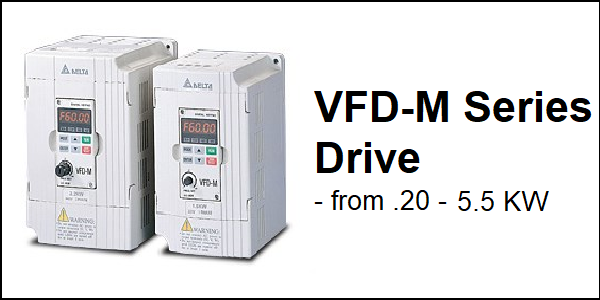
Download Links
 Download Catalog Download Catalog |
Download Manual |
Wiring Details
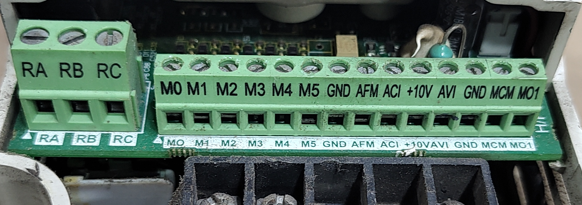
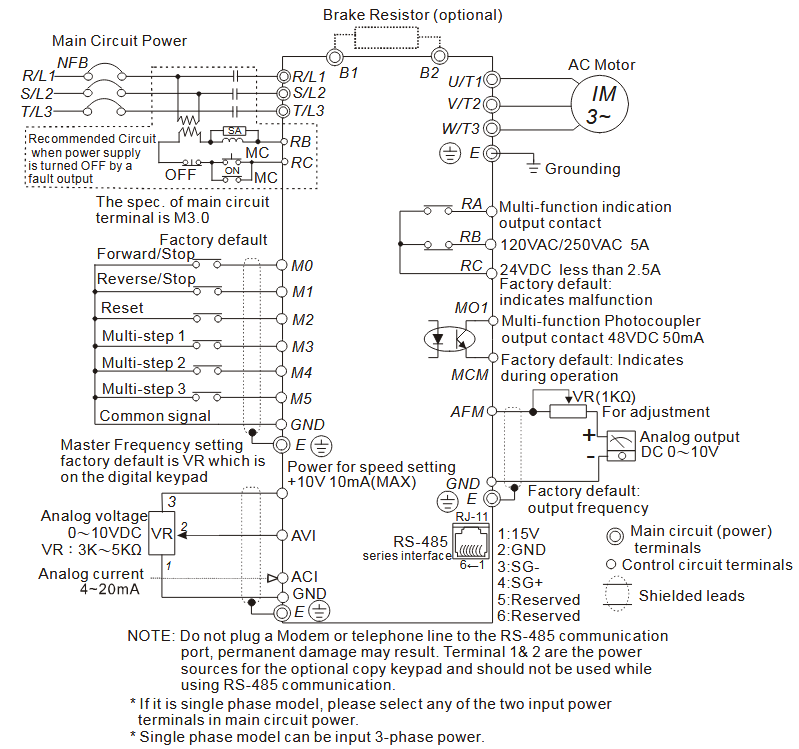
Below image show terminal details:
Faults & Alarms
Search from below list for VFD-M series drive faults & alarms:
| Fault Code | Cause & Solution |
|---|---|
| EF External fault | Cause: The external terminal EF-GND goes from OFF to ON. – When external terminal EF-GND is closed, the output will be turned off (under N.O. E.F.). Soultion: – Eliminate the fault source and then press the RESET button – Give RESET command after fault has been cleared. |
| bb External Base Block | Cause: External Base Block. (Refer to Pr. 8-06) – This fault comes when drive received this command. Soultion: 1. When the external input terminal (B.B) is active, the AC motor drive output will be turned off. 2. Deactivate the external input terminal (B.B) to operate the AC motor drive again. |
| oc Overcurrent | Cause: Output current of the AC drive exceeds the OC level Soultion: – Extend the accel/decel time – Check whether the motor rating and the AC drive rating match up with each other – Check whether there is short-circuit among U-V-W of the AC drive – Check whether the wiring to the motor is short-circuited or grounded – Check whether the screw between the AC drive and the motor is tightened or not – Check whether the motor is over loaded |
| ov/ou overvoltage | Cause: DC voltage of the main circuit exceeds the over-voltage detection level – The DC bus voltage has exceeded its maximum allowable value. Soultion: – Check whether the input voltage is within the scope of the rated input voltage of the AC drive, and monitor whether there is any occurrence of the voltage transients – If it is of the motor inertia uprising voltage that caused the exceeding voltage on the DC high-voltage side within the AC drive, the solution is to extend the accel/decel time or install the braking resistor (optional) |
| oH Overheating | Cause: Overheating- Heat sink temperature too high Soultion: 1. Ensure that the ambient temperature falls within the specified temperature range. 2. Make sure that the ventilation holes are not obstructed. 3. Remove any foreign objects from the heatsinks and check for possible dirty heat sink fins. 4. Check the fan and clean it. 5. Provide enough spacing for adequate ventilation |
| Lu/Lv Low Voltage | Cause: DC high-voltage side is exceedingly low within the AC drive Soultion: – Check whether the input power voltage is normal – Check whether the loading will be put on another unexpected heavy loading – Whether the 3-phase model is of the single-phase power input or the phase-lacking |
| oL overload | Cause: AC drive overload- Output current exceeds the AC drive-bearable current; e.g. could sustain for 60 seconds if the output is 150% of the AC drive rated current. Soultion: – Decrease the loading and extend the acceleration time – Check whether the motor is overloaded – Reduce torque compensation setting as set in Pr.54. – Increase the AC drive output capacity |
| oL1 Overload 1 | Cause: Overload 1- Internal electronic overload trip Soultion: 1. Check for possible motor overload. 2. Check electronic thermal overload setting. 3. Use a higher power motor. 4. Reduce the current level so that the drive output current does not exceed the value set by the Motor Rated Current Pr.7-00. |
| oL2 Motor overload | Cause: OL2- motor overload Motor with exceedingly great loading Soultion: – Check whether the loading of the motor is too great – Check the parameter settings (Pr.60 to Pr.62) |
| ocA Over-current during acceleration | Cause: Over-current during acceleration (Output current exceeds triple rated current during acceleration.). Soultion: 1. Short-circuit at motor output: Check for possible poor insulation at the output lines. 2. Acceleration Time too short: Increase the Acceleration Time. 3. AC motor drive output power is too small: Replace the AC motor drive with the next higher power model. |
| ocd Over-current during deceleration | Cause: Over-current during deceleration (Output current exceeds triple rated current during deceleration.) Soultion: 1. Short-circuit at motor output: Check for possible poor insulation at the output line. 2. Deceleration Time too short: Increase the Deceleration Time. 3. AC motor drive output power is too small: Replace the AC motor drive with the next higher power model. |
| ocn Over-current during steady state operation | Cause: Over-current during steady state operation (Output current exceeds triple rated current during constant speed.) Soultion: 1. Short-circuit at motor output: Check for possible poor insulation at the output line. 2. Sudden increase in motor loading: Check for possible motor stall. 3. AC motor drive output power is too small: Replace the AC motor drive with the next higher power model. |
| cF1 Internal EEPROM can not be programmed | Cause: Internal EEPROM can not be programmed. Soultion: 1. Press “RESET” key to the factory setting 2. After this same fault comes then there is an hardware issue in drive need to repair or replace drive. |
| cF2 Internal EEPROM can not be read | Cause: Internal EEPROM can not be read. Soultion: 1. Press “RESET” key to the factory setting 2. After this same fault comes then there is an hardware issue in drive need to repair or replace drive. |
| EF External fault | Cause: The external terminal EF-GND goes from OFF to ON. – When external terminal EF-GND is closed, the output will be turned off (under N.O. E.F.). Soultion: – Eliminate the fault source and then press the RESET button – Give RESET command after fault has been cleared. |
| cE1 Communication Error | Cause: Communication Error. Soultion: 1. Check the RS485 connection between the AC motor drive and RS485 master for loose wires and wiring to correct pins. 2. Check if the communication protocol, address, transmission speed, etc. are properly set. 3. Use the correct checksum calculation. |
| bb External Base Block | Cause: External Base Block. (Refer to Pr. 8-06) – This fault comes when drive received this command. Soultion: 1. When the external input terminal (B.B) is active, the AC motor drive output will be turned off. 2. Deactivate the external input terminal (B.B) to operate the AC motor drive again. |
| cFA Auto accel/decel failure | Cause: Auto accel/decel failure. Soultion: 1. Check if the motor is suitable for operation by AC motor drive. 2. Check if the regenerative energy is too large. 3. Load may have changed suddenly. |
| GFF Ground fault | Cause: Ground fault- When (one of) the output terminal(s) is grounded, short circuit current is more than 50% of AC motor drive rated current, the AC motor drive power module may be damaged. NOTE: The short circuit protection is provided for AC motor drive protection, not for protection of the user. Soultion: 1. Check whether the IGBT power module is damaged. 2. Check for possible poor insulation at the output line. |
| HPF | Cause: – OC hardware error – CC (current clamp) – OV hardware error – GFF hardware error Soultion: There is an hardware or software issue in drive. Need to repair or replace drive. |
| cF3 | Cause: – OV or LV – Current sensor error – U-phase error – W-phase error Soultion: There is an hardware or software issue in drive. Need to repair or replace drive. |
| PHL Phase loss | Cause: Power input phase-lacking Phase-lacking within the input power of the AC drive Three imbalanced conditions existed within the input voltage Soultion: – Check whether the power voltage is normal. – Check whether the screw at the input power terminal is tightened. |
| CcodE Software protection failure | Cause: Software protection failure. Soultion: There is an hardware or software issue in drive. Need to repair or replace drive. |
| FbE PID feedback signal error | Cause: PID feedback signal error. Soultion: 1. Check parameter settings (Pr.116) and AVI/ACI wiring. 2. Check for possible fault between system response time and the PID feedback signal detection time (Pr.123) |
| c.F3. Hardware Overheating | Cause: Hardware Overheating Soultion: Make sure that the temperature of NTC (Negative Temperature Coefficient) is lower than 109°c after the power is turned on. |