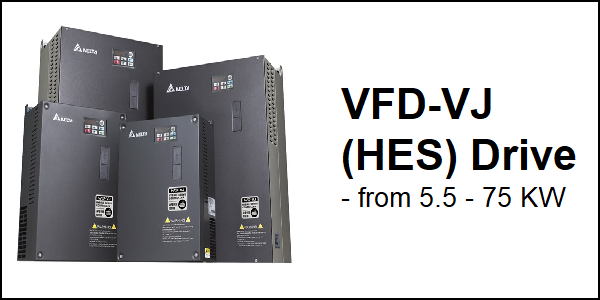
Download Links
 Download Catalog Download Catalog |
Download Manual |
Wiring Details
Below image show terminal details:
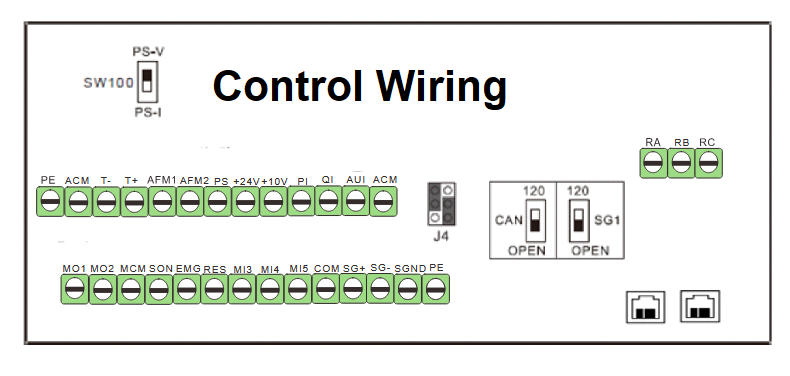
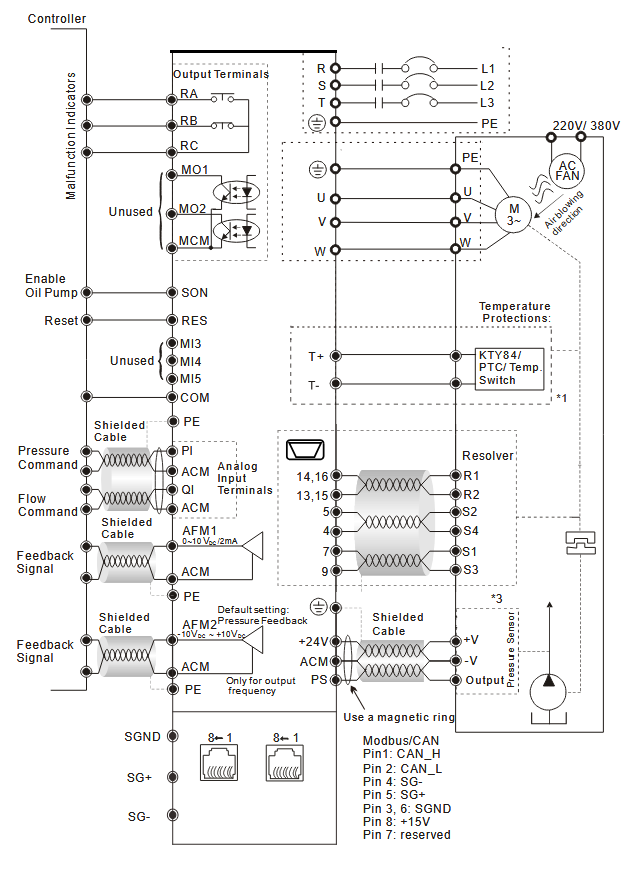
Faults & Alarms
Search from below list for VFD-VJ (HES) drive faults & alarms:
| Fault Code | Cause & Solution |
|---|---|
| E21 oL The hybrid motor drive detects excessive output current | Cause: The hybrid motor drive detects excessive output current. Soultion: 1. Check if the hybrid servo motor is stalled. 2. Replace the hybrid servo drive with a larger output capacity model. 3. Set Pr00-04=29, observe if the value returns to zero after every molding cycle. If the number accumulates to 100, OL occurs 4. The causes of this error could be loose contact/ disconnection between encoder, servo drive and the motor. 5. This error also occurs when a motor or an oil pump is stalled which make unusual rotating speed and over current. |
| E49 – EF External Fault | Cause: When external terminals EF are closed, Hybrid servo drive stops its output (EF). Soultion: 1. Troubleshoot and press the RESET button. |
| E60 – bF Brake transistor error | Cause: Brake transistor error. Solution: Soultion: Press the RESET button on the keypad to clear this error code. After this same fault comes then there is an hardware issue in drive need to repair or replace drive. |
| F72 – bro Braking resistor is open-circuit | Cause: Braking resistor is open-circuit. Soultion: 1. Check if the braking resistor is open-circuit or properly wired? |
| E1 – ocA Over current occurs in acceleration | Cause: Output current exceeds by three times the rated current of the drive. Soultion: 1. Check if the insulation of the wire from U-V-W to the hybrid servo motor is bad. 2. Check if the hybrid servo motor is stalled. 3. Such errors occur when the red light of PG card flashes. The causes of these errors could be loose contact/ disconnection between encoder, motor drive and motor. 4. When such errors occur at the beginning, during or at the end of pressure/ flow command – Adjust also the ramp up/down rate of pressure/flow command (Pr00-29 to Pr00-32) or – Adjust the pressure/ flow reference time (Pr00-46~ Pr00-49) or – Adjust the slope from the hybrid servo drive. 5. When such errors occur while pressure/ flow command is constant, adjust PI value (Pr.00-20 ~ Pr.00-25). 6. Make sure if there is any disturbance/ noise, set Pr00-04: #11 (Pressure feedback), #12(Pressure command), #25 (flow rate command). Then observe if the values fluctuate. 7. Replace the hybrid servo drive with a larger output capacity model. |
| E2- ocd Over current occurs in deceleration | Cause: Output current exceeds by three times the rated current of the drive. Soultion: 1. Check if the insulation of the wire from U-V-W to the hybrid servo motor is bad. 2. Check if the hybrid servo motor is stalled. 3. Such errors occur when the red light of PG card flashes. The causes of these errors could be loose contact/ disconnection between encoder, motor drive and motor. 4. When such errors occur at the beginning, during or at the end of pressure/ flow command – Adjust also the ramp up/down rate of pressure/flow command (Pr00-29 to Pr00-32) or – Adjust the pressure/ flow reference time (Pr00-46~ Pr00-49) or – Adjust the slope from the hybrid servo drive. 5. When such errors occur while pressure/ flow command is constant, adjust PI value (Pr.00-20 ~ Pr.00-25). 6. Make sure if there is any disturbance/ noise, set Pr00-04: #11 (Pressure feedback), #12(Pressure command), #25 (flow rate command). Then observe if the values fluctuate. 7. Replace the hybrid servo drive with a larger output capacity model. |
| E3- ocn Over current occurs during constant speed | Cause: Output current exceeds by three times the rated current of the drive. Soultion: 1. Check if the insulation of the wire from U-V-W to the hybrid servo motor is bad. 2. Check if the hybrid servo motor is stalled. 3. Such errors occur when the red light of PG card flashes. The causes of these errors could be loose contact/ disconnection between encoder, motor drive and motor. 4. When such errors occur at the beginning, during or at the end of pressure/ flow command – Adjust also the ramp up/down rate of pressure/flow command (Pr00-29 to Pr00-32) or – Adjust the pressure/ flow reference time (Pr00-46~ Pr00-49) or – Adjust the slope from the hybrid servo drive. 5. When such errors occur while pressure/ flow command is constant, adjust PI value (Pr.00-20 ~ Pr.00-25). 6. Make sure if there is any disturbance/ noise, set Pr00-04: #11 (Pressure feedback), #12(Pressure command), #25 (flow rate command). Then observe if the values fluctuate. 7. Replace the hybrid servo drive with a larger output capacity model. |
| E4 – GFF Ground fault | Cause: Ground wire protection applies when one of the output terminals are grounded and the ground current is higher than its rated value by over. Soultion: 1. Check the wire of hybrid servo motor is shorted or grounded. 2. Check if IGBT power module is damaged. 3. Check if the output side wire has bad insulation. |
| E5 – occ IGBT short circuit | Cause: IGBT short circuit between upper and lower bridge. Solution: 1. Short-circuit is detected between the upper and lower bridge of the IGBT module. 2. Check the motor wiring. 3. Cycle the power. 4. After this same fault comes then there is an hardware issue in drive need to repair or replace drive. |
| E6 – ocS Over-current or hardware failure | Cause: Over-current or hardware failure in current detection at Stop. Soultion: 1. There is an hardware or software issue in drive. Need to repair or replace drive. |
| E7 – ovA DC bus over-voltage during acceleration | Cause: Excessive intermediate circuit DC voltage. Soultion: 1. Check if the input voltage is within the range of voltage rating of Hybrid Servo Drive and monitor for any occurrence of surge voltage. 2. The issue can be resolved by adjusting the software brake action level in Pr.02-00. 3. When such error occurred at the beginning, during or at the end of the pressure/ flow command, adjust Pr.00-29 ~Pr.00-32 |
| E8 – ovd DC bus over-voltage during deceleration | Cause: DC bus over-voltage during deceleration. Soultion: 1. Check if the input voltage is within the range of voltage rating of Hybrid Servo Drive and monitor for any occurrence of surge voltage. 2. The issue can be resolved by adjusting the software brake action level in Pr.02-00. 3. When such error occurred at the beginning, during or at the end of the pressure/ flow command, adjust Pr.00-29 ~Pr.00-32 |
| E9 – ovn DC bus over-voltage at constant speed | Cause: DC bus over-voltage at constant speed. Soultion: 1. Check if the input voltage is within the range of voltage rating of Hybrid Servo Drive and monitor for any occurrence of surge voltage. 2. The issue can be resolved by adjusting the software brake action level in Pr.02-00. 3. When such error occurred at the beginning, during or at the end of the pressure/ flow command, adjust Pr.00-29 ~Pr.00-32 |
| E10 – ovS Over voltage occurs at stop | Cause: Over voltage occurs at stop and hardware failure. Cause & Solution: 1. Check if the input voltage is within the range of voltage rating of hybrid servo drive and monitor for any occurrence of surge voltage. |
| E11- LvA DC bus voltage is lower during acceleration | Cause: DC bus voltage is lower than the setting at Pr02-07 during acceleration. Soultion: 1. Check if the voltage of input power is normal. 2. Check if there is any sudden heavy load. 3. Adjust the low voltage level in Pr.02-07. 4. Lvn often occurs when the motor drive has a power failure while the operating signals are still being sent. |
| E12 – Lvd DC bus voltage is lower during deceleration | Cause: DC bus voltage is lower than the setting in Pr02-07 during deceleration. Soultion: 1. Check if the voltage of input power is normal. 2. Check if there is any sudden heavy load. 3. Adjust the low voltage level in Pr.02-07. 4. Lvn often occurs when the motor drive has a power failure while the operating signals are still being sent. |
| E13 – Lvn DC bus voltage at constant speed | Cause: DC bus voltage is lower than the setting at Pr.02-07 when running at constant speed. Soultion: 1. Check if the voltage of input power is normal. 2. Check if there is any sudden heavy load. 3. Adjust the low voltage level in Pr.02-07. 4. Lvn often occurs when the motor drive has a power failure while the operating signals are still being sent. |
| E14 – LvS DC bus voltage is lower at stop | Cause: DC bus voltage is lower than the setting at Pr.02-07 at stop. Soultion: 1. Check if the voltage of input power is normal. 2. Check if there is any sudden heavy load. 3. Adjust the low voltage level in Pr.02-07. 4. Lvn often occurs when the motor drive has a power failure while the operating signals are still being sent. |
| E15- orP Phase loss protection | Cause: Phase loss protection. Soultion: 1. Check if only single-phase power is sent or phase los occurs for three phase models. |
| E16- oH1 IGBT’s temperature exceeds the protection level | Cause: IGBT’s temperature exceeds the protection level Soultion: 1. Check if ambient temperature is too high. 2. Check if there is any foreign object on the heat sink and if the fan is running. 3. Check if there is enough space for air circulation for Hybrid Servo Drive. |
| E17 – oH2 Capacitors temperature exceeds the protection level | Cause: Capacitors temperature exceeds the protection level). Soultion: 1. Check if ambient temperature is too high. 2. Check if there is any foreign object on the heat sink and if the fan is running. 3. Check if there is enough space for air circulation for hybrid servo drive |
| E18 -tH1o Hardware failure | Cause: Hardware failure. Soultion: There is an hardware or software issue in drive. Need to repair or replace drive. |
| E19 – tH2o Hardware failure | Cause: Hardware failure. Soultion: There is an hardware or software issue in drive. Need to repair or replace drive. |
| E20 – oHF IGBT overheated and cooling fan failure | Cause: IGBT overheated and cooling fan failure. Soultion: 1. Check the fan kit to see if it is blocked. 2. After this same fault comes then there is an hardware issue in drive need to repair or replace drive. |
| E21 oL The hybrid motor drive detects excessive output current | Cause: The hybrid motor drive detects excessive output current. Soultion: 1. Check if the hybrid servo motor is stalled. 2. Replace the hybrid servo drive with a larger output capacity model. 3. Set Pr00-04=29, observe if the value returns to zero after every molding cycle. If the number accumulates to 100, OL occurs 4. The causes of this error could be loose contact/ disconnection between encoder, servo drive and the motor. 5. This error also occurs when a motor or an oil pump is stalled which make unusual rotating speed and over current. |
| E22 – EoL1 Servo motor overload | Cause: Servo motor overload . Soultion: 1. Set Pr00-04=30 (v2.06 and above), observe if the value returns to zero after every molding cycle. If the number accumulates to 100, EoL occurs. Change the molding conditions. 2. Replace with the hybrid servo drive with a larger output capacity model. 3. If the pressure –flow is too high during the blending, such error occurs easily. To clear this error, decrease the pressure command and the flow command. |
| E24 – oH3 (02-09 PTC level) Overheating | Cause: Overheating inside the motor drive detected by hybrid servo drive, exceeding the protection level (Pr02-09 PTC level). Soultion: 1. Check if the motor drive is blocked. 2. Check if the ambient temperature is too high. 3. Increase the capacity of the motor drive. |
| E30 – cF1 Error on memory write-in | Cause: Error on memory write-in. Soultion: 1. Press RESET key to return all parameters to factory default values. 2. After this same fault comes then there is an hardware issue in drive need to repair or replace drive. |
| E31 – cF2 Error on memory readout | Cause: Error on memory readout Soultion: 1. Press RESET key to return all parameters to factory default values. 2. After this same fault comes then there is an hardware issue in drive need to repair or replace drive. |
| F32 – cd0 Detection of abnormal output of three-phase total current | Cause: Detection of abnormal output of three-phase total current. Soultion: 1. Turn off the power and restart. 2. After this same fault comes then there is an hardware issue in drive need to repair or replace drive. |
| F33 – cd1 Detection of abnormal current in phase U | Cause: Detection of abnormal current in phase U. Soultion: 1. Turn off the power and restart. 2. After this same fault comes then there is an hardware issue in drive need to repair or replace drive. |
| F34 – cd2 Detection of abnormal current in phase V | Cause: Detection of abnormal current in phase V. Soultion: 1. Turn off the power and restart. 2. After this same fault comes then there is an hardware issue in drive need to repair or replace drive. |
| F35 – cd3 Detection of abnormal current in phase W | Cause: Detection of abnormal current in phase W. Soultion: 1. Turn off the power and restart. 2. After this same fault comes then there is an hardware issue in drive need to repair or replace drive. |
| F36 – Hd0 Clamp current detection error | Cause: Clamp current detection error. Soultion: 1. Turn off the power and restart. 2. After this same fault comes then there is an hardware issue in drive need to repair or replace drive. |
| F37 – Hd1 Over-current detection error | Cause: Over-current detection error. Soultion: 1. Turn off the power and restart. 2. After this same fault comes then there is an hardware issue in drive need to repair or replace drive. |
| F38 Hd2 Over-voltage detection error | Cause: Over-voltage detection error. Soultion: 1. Turn off the power and restart. 2. After this same fault comes then there is an hardware issue in drive need to repair or replace drive. |
| F39 – Hd3 Ground current detection error | Cause: Ground current detection error. Soultion: – The motor burns down or the insulation ages: Use a high resistance meter to measure the insulation resistance of the motor. If the insulation is poor, replace with a new motor. – Short circuit caused by the damaged cables. Troubleshoot the damaged parts or replace with new cables. – The stray capacitance between the cable and the ground terminal is large: If the length of the motor cable at the field is longer than 100 m in the field, decrease the setting value of the carrier frequency. Take steps to reduce the stray capacitance. – Faults caused by the noise interference. Verify the communication circuit wiring and the ground wiring. Separate the communication circuit wiring and or the ground wiring from the main circuit wiring or make a 90-degree wiring to reduce the noise interference. – Hardware failure. Verify if anything wrong on the motor, motor cable and measure motor cable length. Power off the hybrid servo drive, wait for 5 minutes and re-power on. – After this same fault comes then there is an hardware issue in drive need to repair or replace drive. |
| E40 – AuE Auto tuning error | Cause: Auto tuning error. Solution: 1. Check if the wiring of the motor is correct. 2. Check if the motor’s parameter settings are correct. |
| E42 – PGF1 PG feedback error | Cause: PG feedback error. Soultion: 1. The actual rotating speed doesn’t follow speed command and the elapsed time longer than one second. 2. In this case, check if Pr01-30 Is not equal to zero and check PG feedback wiring. |
| E43 PGF2 PG feedback loss | Cause: PG feedback loss. Soultion: 1. Check the PG feedback wiring. It could be an open circuit. |
| E44 – PGF3 Stalled PG feedback | Cause: Stalled PG feedback (the actual rotating speed is 115% faster than the maximum speed and the elapsed time longer than one second). Soultion: 1. Check the PG feedback wiring. 2. Check if PI gain and the settings for acceleration/ deceleration are suitable. 3. Check if there’s an output phase loss. 4. The causes of these errors could be loose contact/ disconnection between encoder, hybrid servo motor drive and motor. (OC might also occur in different conditions.). 5. Check if the connection between oil pump and motor is stuck. 6. After this same fault comes then there is an hardware issue in drive need to repair or replace drive. |
| E45 – PGF4 PG slip error | Cause: PG slip error. Soultion: 1. Check the PG feedback wiring. 2. Check if PI gain and the settings for acceleration/ deceleration are suitable. 3. Check if there’s an output phase loss. 4. The causes of these errors could be loose contact/ disconnection between encoder, hybrid servo motor drive and motor. (OC might also occur in different conditions.). 5. Check if the connection between oil pump and motor is stuck. 6. After this same fault comes then there is an hardware issue in drive need to repair or replace drive. |
| E49 – EF External Fault | Cause: When external terminals EF are closed, Hybrid servo drive stops its output (EF). Soultion: 1. Troubleshoot and press the RESET button. |
| E50 – EF1 Emergency stop | Cause: When external EMG terminal is not connected to the heating switch of hybrid servo motor or the motor is overheated (130 ºC), hybrid servo drive stops its input. Soultion: 1. Troubleshoot and press the RESET button. |
| F52 – Pcod Password is locked | Cause: Password is locked after three attempts. Soultion: 1. Shut down the servo drive, wait for certain time. Make sure that the power indicator is off. (≤ 22kW: wait for 5 min after shut down; ≥ 30kW: wait for 10 min after shut down). Then restart the servo drive and enter the right password. |
| F53 – ccod CPU fault | Cause: CPU fault. Soultion: There is an hardware or software issue in drive. Need to repair or replace drive. |
| E54 – cE1 Illegal command | Cause: Illegal command. Soultion: Verify if the communication command is correct (Communication code must be 03, 06, 10). |
| E55 – cE2 Illegal data address | Cause: Illegal data address. Soultion: Verify if the communication data length is correct. |
| E56 – cE3 Illegal data value | Cause: Illegal data value. Soultion: Verify if the data value is bigger than the maximum or smaller than the minimum value. |
| E57 – cE4 Data is written to read-only address | Cause: Data is written to read-only address. Soultion: Verify if the communication address is correct. |
| E58 – cE10 Modbus transmission time-out | Cause: Modbus transmission time-out. Soultion: Verify the wiring and grounding of the communication circuit. Press the RESET button on the keypad to clear this error code. |
| E60 – bF Brake transistor error | Cause: Brake transistor error. Solution: Soultion: Press the RESET button on the keypad to clear this error code. After this same fault comes then there is an hardware issue in drive need to repair or replace drive. |
| E65 – PGF5 Hardware error of PG card | Cause: Hardware error of PG card or magnetic pole tuning fault. Soultion: 1. Verify the setting of Pr.01-07 Motor Parameter Auto Tuning. 2. After this same fault comes then there is an hardware issue in drive need to repair or replace drive. |
| E66 – ovP Overpressure | Cause: Overpressure. Soultion: 1. Check if the pressure sensor is working properly and if its specification is correct. 2. Adjust pressure PI control Pr.00-20~00-37. 3. Check if the wiring of pressure sensor is correct. 4. Check the position of SW100 dip switch (current type or open collector) on the control board if correct. |
| E67 – PfbF Pressure feedback error | Cause: Pressure feedback error. Soultion: 1. Check if the wiring of pressure sensor is correct. It could be open-circuit. 2. Check if the pressure sensor signal isbelow 1V. |
| E68 – Prev Oil pump runs reversely | Cause: Oil pump runs reversely. Soultion: 1. Check if there’s any zero shift at the pressure sensor. 2. Check if the wiring of pressure sensor is correct. |
| E69 – noil Oil shortage | Cause: Oil shortage. Soultion: 1. Check the amount of oil in the oil tank. 2. Check if any leakage at hydraulic circuit. 3. If there’s a suction filter installed at the oil inlet, check if that suction filter is blocked up. |
| E70 – tUP Business hours end | Cause: Business hours end. Soultion: There is an hardware or software issue in drive. Need to repair or replace drive. |
| E71 – ocbs Over current at braking chopper | Cause: Over current at braking chopper. Soultion: 1. Check if the braking chopper is short-circuit. 2. Is the resistance value too small? 3. After this same fault comes then there is an hardware issue in drive need to repair or replace drive. |
| F72 – bro Braking resistor is open-circuit | Cause: Braking resistor is open-circuit. Soultion: 1. Check if the braking resistor is open-circuit or properly wired? |
| F73 – brF Braking resistor resistance value is too small | Cause: Braking resistor’s resistance value is too small. Soultion: 1. Check if the resistance value big enough? |
| E74 – oH4 Braking chopper overheated | Cause: Braking chopper overheated. Soultion: 1. Check if there are too many times of deceleration and pressure releasing during formation period? 2. Modify formation period. |
| E75 – tH4o Error occurred on braking chopper’s thermo protection line | Cause: Error occurred on braking chopper’s thermo-protection line. Soultion: There is an hardware or software issue in drive. Need to repair or replace drive. |
| E78 – b.GFF Ground fault | Cause: The ground short is detected before running the servo drive, because all theupper arms or all the lower arms are turned on. Soultion: 1. Only after this fault occurs for 5 seconds, you can reset the servo drive. 2. After this same fault comes then there is an hardware issue in drive need to repair or replace drive. |
| E79 – A.oc U-phase Short | Cause: The U-phase short is detected before running the servo drive because U-phase and V-phase are turned on. Soultion: There is an hardware or software issue in drive. Need to repair or replace drive. |
| E80 – B.oc U-phase Short | Cause: The V-phase short is detected before running the servo drive because V-phase and W-phase are turned on. Soultion: There is an hardware or software issue in drive. Need to repair or replace drive. |
| E81 – C.oc U-phase Short | Cause: The W-phase short is detected before running the servo drive because W-phase and U-phase are turned on. Soultion: There is an hardware or software issue in drive. Need to repair or replace drive. |
| E82 – oPL1 Output Phase Loss on Phase U | Cause: Output Phase Loss on Phase U. Soultion: 1. Check if the wiring of motor to see if any loose or broken wires. 2. Check if the resistance of each phase is the same. 3. Use an ampere-meter to measure if the three-phase current is in balance. 4. After this same fault comes then there is an hardware issue in drive need to repair or replace drive. |
| E83 – oPL2 Output Phase Loss on Phase V | Cause: Output Phase Loss on Phase V. Soultion: 1. Check if the wiring of motor to see if any loose or broken wires. 2. Check if the resistance of each phase is the same. 3. Use an ampere-meter to measure if the three-phase current is in balance. 4. After this same fault comes then there is an hardware issue in drive need to repair or replace drive. |
| E84 – oPL3 Output Phase Loss on Phase W | Cause: Output Phase Loss on Phase W. Soultion: 1. Check if the wiring of motor to see if any loose or broken wires. 2. Check if the resistance of each phase is the same. 3. Use an ampere-meter to measure if the three-phase current is in balance. 4. After this same fault comes then there is an hardware issue in drive need to repair or replace drive. |
| E87 oL3 Servo drive overloading | Cause: Servo drive overloading while running at low frequency. Soultion: 1. Reduce the ambient temperature of the operating drive. 2. Replace the drive with a larger power model. 3. Reset drive parameters or decrease carrier frequency. 4. After this same fault comes then there is an hardware issue in drive need to repair or replace drive. |
| E90 – SLE Slave pump fault | Cause: Slave pump fault. Soultion: 1. Verify if any issue occurs on each slave pump. 2. Troubleshoot those issues. 3. Then press the RESET button to clear this fault code. |
| E93 AUE.A The current at U-phase is too small | Cause: The current at U-phase is too small. (The IGBT at U-phase is open circuit or an error occurs on the current sensor.) Soultion: 1. Verify if the servo drive and the motor are properly connected 2. The magnetic contactor installed on the output side (U/V/W) of the servo drive is at open-circuit. Make sure that it must be at close-circuit. |
| E94 AUE.b The current at V-phase is too small | Cause: The current at V-phase is too small. (The IGBT at V-phase is open circuit or an error occurs on the current sensor.) Soultion: 1. 1. Verify if the servo drive and the motor are properly connected 2. The magnetic contactor installed on the output side (U/V/W) of the servo drive is at open-circuit. Make sure that it must be at close-circuit. |
| E95 – AUE.c The current at W-phase is too small | Cause: The current at W-phase is too small. (The IGBT at W-phase is open circuit or an error occurs on the current sensor.) Soultion: 1. Verify if the servo drive and the motor are properly connected 2. The magnetic contactor installed on the output side (U/V/W) of the servo drive is at open-circuit. Make sure that it must be at close-circuit. |
| E96 – AUE.P Error occurred on the encoder | Cause: Error occurred on the encoder (cable connection error). Soultion: 1. Verify if the encoder is properly connected to the servo drive and if theparameters are correctly set. 2. Reboot the hybrid servo drive. 3. After this same fault comes then there is an hardware issue in drive need to repair or replace drive. |
| E101 CGdE Software error 1 occurred on CANopen | Cause: Software error 1 occurred on CANopen (CANopen guarding error). Soultion: 1. Increase guarding time (Index 100C). 2. Check the communication wiring and grounding. 90 degrees wiring layout or separation from main circuit is suggested to prevent interference. 3. Make sure the communication wiring is serial. 4. Use dedicated CANopen cable and install terminating resistor. 5. Check the status of communication cable or change new cable. |
| E102 – CHbE Software error 2 occurred on CANopen | Cause: Software error 2 occurred on CANopen (CANopen heartbeat error.). Soultion: 1. Increase Heart beat time (Index 1016). 2. Check the communication wiring and grounding. 90 degrees wiring layout or separation from main circuit is suggested to prevent interference. 3. Make sure the communication wiring is serial. 4. Use dedicated CANopen cable and install terminating resistor. 5. Check the status of communication cable or change new cable. |
| E104 – CbFE Hardware error occurred on CANopen | Cause: Hardware error occurred on CANopen (CANopen bus off error). Soultion: 1. Re-install CANopen card. 2. Check the communication wiring and grounding. 90 degrees wiring layout or separation from main circuit is suggested to prevent interference. 3. Make sure the communication wiring is serial. 4. Use dedicated CANopen cable and install terminating resistor. |
E105 CIdE Index setting error occurred on CANopen | Cause: Index setting error occurred on CANopen (CANopen index error). Soultion: 1. Disable CANopen (Pr.04-17=0) 2. Reset CANopen Index (Pr.04-17) |
| E106 – CAdE Slave # setting error | Cause: Slave # setting error occurred on CANopen (CAdE). Soultion: 1. Disable CANopen (Pr.04-17=0) 2. Reset CANopen Index (Pr.04-17) |
| E107 – CFrE CANopen Index is Out of Range | Cause: CANopen Index is Out of Range CANopen (CANopen memory error). Soultion: 1. Disable CANopen (Pr04-17=0) 2. Reset CANopen Index (Pr04-17) |
| FAn Fan fault | Cause: There is an issue in drive cooling fan. Soultion: 1. Check whether the fan is blocked 2. After this same fault comes then there is an hardware issue in drive need to repair or replace drive. |