Download Links
 Download Catalog Download Catalog |
Download Manual |
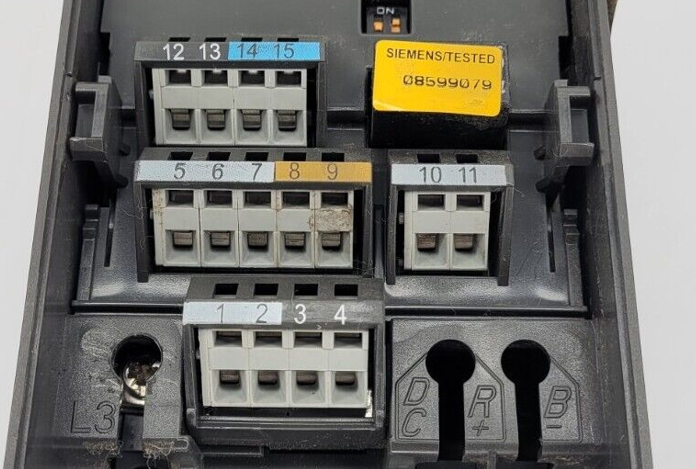
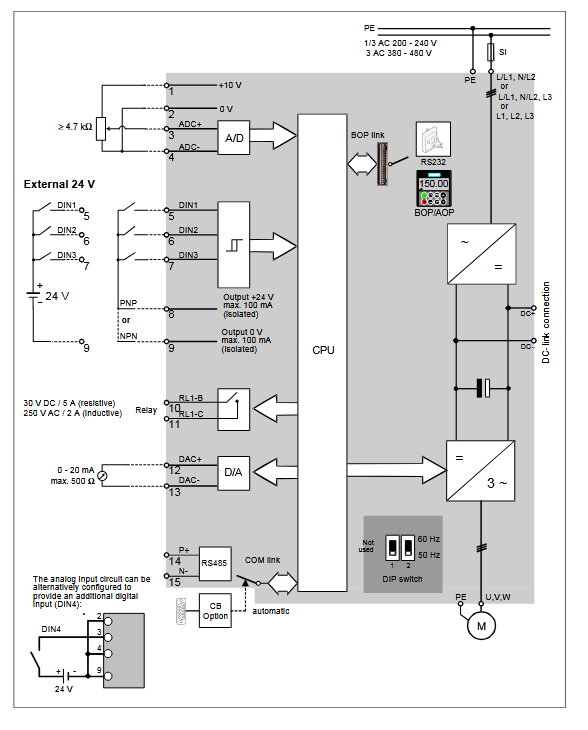
Wiring Details
Below image show terminal details:
Faults & Alarms
Search from below list for MM420 drive faults & alarms:
| Fault Codes | Cause & Solution |
|---|---|
| F0001 Overcurrent | Cause: – Motor power does not correspond to the inverter power – Motor lead short circuit – Earth fault Soultion: Check the following: 1. Motor power (P0307) must correspond to inverter power (P0206) 2. Cable length limits must not be exceeded 3. Motor cable and motor must have no short- circuits or earth faults 4. Motor parameters must match the motor in use 5. Value of stator resistance (P0350) must be correct 6. Motor must not be obstructed or overloaded – Increase the ramp time – Reduce the boost level |
| F0002 Overvoltage | Cause: – DC-link voltage (r0026) exceeds trip level (P2172) – Overvoltage can be caused either by too high main supply voltage or if motor is in regenerative mode – Regenerative mode can be cause by fast ramp downs or if the motor is driven from an active load Soultion: Check the following: 1. Supply voltage (P0210) must lie within limits indicated on rating plate 2. DC-link voltage controller must be enabled (P1240) and parameterized properly 3. Ramp-down time (P1121) must match inertia of load |
| F0003 Undervoltage | Cause: – Main supply failed – Shock load outside specified limits Soultion: Check the following: 1. Supply voltage (P0210) must lie within limits indicated on rating plate 2. Supply must not be susceptible to temporary failures or voltage reductions |
| F0004 Inverter Over-temperature | Cause: – Ambient temperature outside of limits, – Fan failure Soultion: Check the following: 1. Fan must turn when inverter is running 2. Pulse frequency must be set to default value 3. Air inlet and outlet points are not obstructed Ambient temperature could be higher than specified for the inverter. |
| F0005 Inverter I2t | Cause: – Inverter overloaded – Duty cycle too demanding – Motor power (P0307) exceeds inverter power capability (P0206) Soultion: Check the following: 1. Load duty cycle must lie within specified limits 2. Motor power (P0307) must match inverter power (P0206) |
| F0011 Motor Over temperature I2t | Cause: – Motor overloaded – Motor data incorrect – Long time period operating at low speeds Soultion: 1. Check motor data 2. Check loading on motor 3. Boost settings too high (P1310,P1311, P1312) 4. Check parameter for motor thermal time constant 5. Check parameter for motor I2t warning level |
| F0041 Stator resistance measurement failure | Cause: Stator resistance measurement failure. Soultion: 1. Check if the motor is connected to the inverter 2. Check that the motor data has been entered correctly |
| F0051 Parameter EEPROM Fault | Cause: Reading or writing of the non-volatile parameter storage has failed Soultion: 1. Factory reset and new parameterization 2. Change inverter |
| F0052 Powerstack Fault | Cause: Reading of the powerstack information has failed or the data is invalid. Soultion: 1. Change inverter. 2. There is an hardware or software issue in drive. Need to repair or replace drive. |
| F0060 Asic Timeout | Cause: Internal communications failure. Soultion: 1. Acknowledge fault 2. Change inverter if repeated, there is an hardware or software issue in drive. Need to repair or replace drive. |
| F0070 Communications board setpoint error | Cause: No setpoint received from communications board during telegram off time. Soultion: 1. Check connections to the communications board. 2. Check the master. |
| F0071 No Data for USS (RS232 link) during Telegramm Off Time | Cause: No response during telegram off time via USS (BOP link). Soultion: 1. Check connections to the communications board. 2. Check the master. |
| F0072 No Data from USS (RS485 link) during Telegram Off Time | Cause: No response during telegram off time via USS (COM link) Soultion: 1. Check connections to the communications board. 2. Check the master. |
| F0080 Analogue input-lost input signal | Cause: – Broken wire – Signal out of limits Soultion: 1. Check connection to analogue input. 2. Check drive control wiring. |
| F0085 External Fault | Cause: External fault is triggered via terminal inputs. Soultion: Disable terminal input for fault trigger. |
| F0101 Stack Overflow | Cause: Software error or processor failure. Soultion: 1. Run self test routines. 2. Change inverter. |
| F0221 PI Feedback below minimum value | Cause: PID Feedback below minimum value P2268. Soultion: 1. Change value of P2268 2. Adjust feedback gain |
| F0222 PI Feedback above maximum value | Cause: PID Feedback above maximum value P2267. Soultion: 1. Change value of P2267. 2. Adjust feedback gain. |
| F0450 BIST Tests Failure | Cause: Fault value 1 Some of the power section tests have failed 2 Some of the control board tests have failed 4 Some of the functional tests have failed 8 Some of the IO module tests have failed 16 The Internal RAM has failed its check on power-up Soultion: 1. Inverter may run but certain actions will not function correctly. 2. Replace inverter. |
| A0501 Current Limit | Cause: – Motor power does not correspond to the inverter power – Motor leads are too short – Earth faults Soultion: 1. Check whether the motor power corresponds to the inverter power. 2. Check that the cable length limits have not been exceeded. 3. Check motor cable and motor for short- circuits and earth faults. 4. Check whether the motor parameters correspond with the motor being used. 5. Check the stator resistance. 6. Increase the ramp-up-time. 7. Reduce the boost. 8. Check whether the motor is obstructed or overloaded. |
| A0502 Overvoltage limit | Cause: – Mains supply too high – Load regenerative – Ramp-down time too short Soultion: 1. Check that mains supply voltage is within allowable range 2. Increase ramp down times Note: Vdc-max controller is active, ramp-down times will be automatically increased. |
| A0503 Undervoltage Limit | Cause: – Mains supply too low – Short mains interruption Soultion: 1. Check main supply voltage (P0210). 2. If supply is ok then check drive rectifier using multimeter. |
| A0504 Inverter Over-temperature | Cause: Warning level of inverter heat-sink temperature (P0614) is exceeded, resulting in pulse frequency reduction and/or output frequency reduction (depending on parametrization in (P0610). Soultion: 1. Check if ambient temperature is within specified limits 2. Check load conditions and duty cycle 3. Check if fan is turning when drive is running |
| A0505 Inverter I2t | Cause: Warning level is exceeded; current will be reduced if parameterized (P0610 = 1) Soultion: 1. Check if duty cycle is within specified limits. |
| A0506 Inverter Duty Cycle | Cause: Heatsink temperature and thermal junction model are outside of allowable range Soultion: 1. Check if duty cycle are within specified limits. |
| A0511 Motor Over- temperature I2t | Cause: Motor overloaded. Soultion: Check the following: 1. P0611 (motor i2t time constant) should be set to appropriate value 2. P0614 (Motor i2t overload warning level) should be set to suitable level 3. Are long periods of operation at low speed occuring 4. Check that boost settings are not too high |
| A0541 Motor Data Identification Active | Cause: Motor data identification (P1910) selected or running. Soultion: 1. Wait until motor identification is finished. 2. This is a informative alarm. |
| A0600 RTOS Overrun Warning | Cause: Software error. Soultion: There is an hardware or software issue in drive. Need to repair or replace drive. |
| A0700 CB warning 1 | Cause: CB (communication board) specific. Soultion: 1. See CB user manual |
| A0701 CB warning 2 | Cause: CB (communication board) specific. Soultion: 1. See CB user manual |
| A0702 CB warning 3 | Cause: CB (communication board) specific. Soultion: 1. See CB user manual |
| A0703 CB warning 4 | Cause: CB (communication board) specific. Soultion: 1. See CB user manual |
| A0704 CB warning 5 | Cause: CB (communication board) specific. Soultion: 1. See CB user manual |
| A0705 CB warning 6 | Cause: CB (communication board) specific. Soultion: 1. See CB user manual |
| A0706 CB warning 7 | Cause: CB (communication board) specific. Soultion: 1. See CB user manual |
| A0707 CB warning 8 | Cause: CB (communication board) specific. Soultion: 1. See CB user manual |
| A0708 CB warning 9 | Cause: CB (communication board) specific. Soultion: 1. See CB user manual |
| A0709 CB warning 10 | Cause: CB (communication board) specific. Soultion: 1. See CB user manual |
| A0710 CB communication error | Cause: Communication with CB (communication board) is lost. Soultion: 1. Check CB hardware. |
| A0711 CB configuration error | Cause: CB (communication board) reports a configuration error Soultion: 1. Check CB parameters |
| A0910 Vdc-max controller de-activated | Cause: Vdc max controller has been de- activated, since controller is not capable of keeping DC-link voltage (r0026) within limits (P2172) – Occurs if main supply voltage (P0210) is permanently too high – Occurs if motor is driven by an active load, causing motor to goes into regenerative mode – Occurs at very high load inertias, when ramping down Soultion: Check the following: 1. Input voltage (P0756) lies within range? 2. Load must match In certain cases apply braking resistor |
| A0911 Vdc-max controller active | Cause: Vdc max controller is active; so ramp- down times will be increased automatically to keep DC-link voltage (r0026) within limits (P2172). Soultion: 1. Check parameter inverter input voltage 2. Check ramp-down times |
| A0912 Vdc-min controller active | Cause: Vdc min controller will be activated if DC-link voltage (r0026) falls below minimum level (P2172). – The kinetic energy of the motor is used to buffer the DC-link voltage, thus causing deceleration of the drive!. – So short mains failures do not necessarily lead to anundervoltage trip. |
| A0920 ADC parameters not set properly | Cause: ADC parameters should not be set to identical values, since this would produce illogical results. – Index 0: Parameter settings for output identical – Index 1: Parameter settings for input identical – Index 2: Parameter settings for input do not correspond to ADC type Soultion: Analogue input parameters should not be set to the same value as each other. |
| A0921 DAC parameters not set properly | Cause: DAC parameters should not be set to identical values, since this would produce illogical results. – Index 0: Parameter settings for output identical. – Index 1: Parameter settings for input identical. – Index 2: Parameter settings for output do not correspond to DAC type. Soultion: Analogue Output parameters should not be set to the same value as each other. |
| A0922 No load applied to inverter | Cause: – No Load is applied to the inverter. – As a result, some functions may not work as under normal load conditions Low output voltage eg when 0 boost applied at 0 Hz. Soultion: 1. Check that load is applied to the inverter. 2. Check motor parameters correspond to motor attached. 3. As a result, some functions may not work correctly, because there is no normal load condition. |
| A0923 Both JOG Left and JOG Right are requested | Cause: Both JOG right and JOG left (P1055/P1056) have been requested. This freezes the RFG output frequency at its current value. JOG right and JOG left signals active together. Soultion: Make sure that JOG right and JOG left signals are not applied simultaneously. |