Download Links
 Download Catalog Download Catalog |
Download Manual |
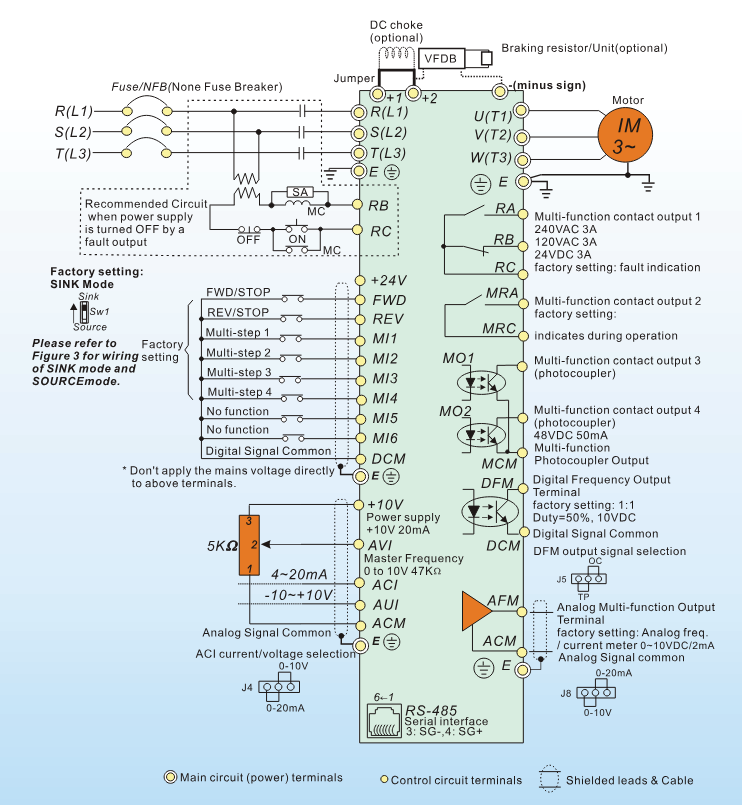
Wiring Details
Below image show terminal details:
Faults & Alarms
Search from below list for VFD-VE series drive faults & alarms:
| Fault Code | Cause & Solution |
|---|---|
| EF External Fault | Cause: External Fault- This is programmable fault, comes when drive received external signal for external fault. Soultion: 1. Input EF (N.O.) on external terminal is closed to GND. Output U, V, W will be turned off. 2. Give RESET command after fault has been cleared. |
| bb External Base Block | Cause: This fault comes when drive received this command. Soultion: 1. When the external input terminal (B.B) is active, the AC motor drive output will be turned off. 2. Deactivate the external input terminal (B.B) to operate the AC motor drive again. |
| bF Brake resistor fault | Cause: Brake resistor fault Soultion: 1. If the fault code is still displayed on the keypad after pressing “RESET” key, then there is an hardware issue in drive need to repair or replace drive. |
| occ Short-circuit | Cause: Short-circuit is detected between upper bridge and lower bridge of the IGBT module. Soultion: There is an hardware or software issue in drive. Need to repair or replace drive. |
| OL Overload | Cause: The AC motor drive detects excessive drive output current. NOTE: The AC motor drive can withstand up to 150% of the rated current for a maximum of 60 seconds. Soultion: 1. Check whether the motor is overloaded. 2. Take the next higher power AC motor drive model. |
| ocA Over-current during acceleration | Cause: Over-current during acceleration (Output current exceeds triple rated current during acceleration.). Soultion: 1. Short-circuit at motor output: Check for possible poor insulation at the output lines. 2. Acceleration Time too short: Increase the Acceleration Time. 3. AC motor drive output power is too small: Replace the AC motor drive with the next higher power model. |
| ocd Over-current during deceleration | Cause: Over-current during deceleration (Output current exceeds triple rated current during deceleration.) Soultion: 1. Short-circuit at motor output: Check for possible poor insulation at the output line. 2. Deceleration Time too short: Increase the Deceleration Time. 3. AC motor drive output power is too small: Replace the AC motor drive with the next higher power model. |
| ocn Over-current during steady state operation | Cause: Over-current during steady state operation (Output current exceeds triple rated current during constant speed.) Soultion: 1. Short-circuit at motor output: Check for possible poor insulation at the output line. 2. Sudden increase in motor loading: Check for possible motor stall. 3. AC motor drive output power is too small: Replace the AC motor drive with the next higher power model. |
| ocs oc5 Hardware failure in current detection | Cause: Hardware failure in current detection. Soultion: There is an hardware or software issue in drive. Need to repair or replace drive. |
| GFF Ground Fault | Meaning: When the drive detects grounding short circuit on the output terminals (U/V/W), the drive closes the gate of the output immediately, the motor runs freely, and the display shows a GFF error. Cause & Solution: 1. Motor burnout or aging insulation occurred – Check the motor insulation value with megger. – Replace the motor if the insulation is poor. 2. Short circuit due to broken cable – Troubleshoot the short circuit. – Replace the cable. 3. Larger stray capacitance of the – cable and terminal – If the motor cable length exceeds 100 m, decrease the setting value for the carrier frequency. – Take remedies to reduce stray capacitance. 4. Malfunction caused by interference – Verify the grounding and wiring of the communication circuit. It is recommended to separate the communication circuit from the main circuit, or wire in 90 degree for effective anti-interference performance. 5. Hardware failure – Cycle the power after checking the status of motor, cable and cable length. If GFF still exists, return to the factory for repair. |
| occ Short-circuit | Cause: Short-circuit is detected between upper bridge and lower bridge of the IGBT module. Soultion: There is an hardware or software issue in drive. Need to repair or replace drive. |
| ouA/ovA DC BUS over-voltage during acceleration | Cause: DC bus over-voltage during acceleration. Solution: 1. Check if the input voltage falls within the rated AC motor drive input voltage range. 2. Check for possible voltage transients. 3. If DC BUS over-voltage due to regenerative voltage, please increase the Deceleration Time or add an optional brake resistor. |
| oud/ovd DC BUS over-voltage during deceleration | Cause: DC BUS over-voltage during deceleration (230V: DC 450V; 460V: DC 900V). Soultion: 1. Check if the input voltage falls within the rated AC motor drive input voltage range. 2. Check for possible voltage transients. 3. If DC BUS over-voltage due to regenerative voltage, please increase the Deceleration Time or add an optional brake resistor. |
| oun/ovn DC BUS over-voltage in constant speed | Cause: DC BUS over-voltage in constant speed (230V: DC 450V; 460V: DC 900V). Soultion: 1. Check if the input voltage falls within the rated AC motor drive input voltage range. 2. Check for possible voltage transients. 3. If DC BUS over-voltage due to regenerative voltage, please increase the Deceleration Time or add an optional brake resistor. |
| ous/ou5 Hardware failure | Cause: Hardware failure in voltage detection. Soultion: 1. Check if input voltage is within specification range and monitor if there is surge voltage. |
| LuA/LvA DC BUS voltage during acceleration | Cause: DC BUS voltage is less than Pr.06-00 during acceleration Soultion: 1. Check if the input voltage is normal 2. Check for possible sudden load |
| Lud/Lvd DC BUS voltage is less than during deceleration | Cause: DC BUS voltage is less than Pr.06-00 during deceleration Soultion: 1. Check if the input voltage is normal 2. Check for possible sudden load |
| Lun/Lvn DC BUS voltage is less than in constant speed | Cause: DC BUS voltage is less than Pr.06-00 in constant speed. Soultion: 1. Check if the input voltage is normal 2. Check for possible sudden load |
| LuS/Lu5 LvS/LvS DC BUS voltage is less at stop | Cause: DC BUS voltage is less than Pr.06-00 at stop Soultion: 1. Check if the input voltage is normal 2. Check for possible sudden load |
| PHL Phase Loss | Cause: Meaning: Input phase loss. Solution: 1. Check Power Source Input if all 3 input phases are connected without loose contacts. For models 40hp and above, please check if the fuse for the AC input circuit is blown. |
| oH1 IGBT overheating | Cause: IGBT overheating IGBT temperature exceeds protection level 1 to15HP: 90 o C 20 to 100HP: 100 o C. Soultion: 1. Ensure that the ambient temperature falls within the specified temperature range. 2. Make sure that the ventilation holes are not obstructed. 3. Remove any foreign objects from the heatsinks and check for possible dirty heat sink fins. 4. Check the fan and clean it. 5. Provide enough spacing for adequate ventilation. |
| oH2 Heatsink overheating | Cause: Heatsink overheating Heat sink temperature exceeds 90 o C. Soultion: 1. Ensure that the ambient temperature falls within the specified temperature range. 2. Make sure that the ventilation holes are not obstructed. 3. Remove any foreign objects from the heatsinks and check for possible dirty heat sink fins. 4. Check the fan and clean it. 5. Provide enough spacing for adequate ventilation. |
| oH3 Motor overheating | Cause: Motor overheating The AC motor drive detects that the internal temperature exceeds Pr.06-30 (PTC level). Soultion: 1. Make sure that the motor is not obstructed. 2. Ensure that the ambient temperature falls within the specified temperature range. 3. Take the next higher power AC motor drive model. |
| TH1o OH1 hardware failure | Cause: OH1 hardware failure Meaning: IGBT hardware failure in temperature detection- NTC broken or wiring failure. – When the IGBT temperature is higher than the protection level, and detection time exceeds 100 ms, the tH1o protection activates. Soultion: There is an hardware or software issue in drive. Need to repair or replace drive. |
| TH2o OH2 hardware failure | Cause: OH2 hardware failure Meaning: IGBT hardware failure in temperature detection- NTC broken or wiring failure. – When the IGBT temperature is higher than the protection level, and detection time exceeds 100 ms, the tH1o protection activates. Soultion: There is an hardware or software issue in drive. Need to repair or replace drive. |
| FAn Fan failure | Cause: Fan failure. Solution: 1. Make sure that the fan is not obstructed. 2. After this same fault comes then there is an hardware issue in drive need to repair or replace drive. |
| FuSE Broken fuse | Cause: Broken fuse- The fuse at DC side is broken for 30hp and below. Soultion: 1. Check whether the fuse of the transistor module is functioning well 2. Check whether the loading side is short- circuit |
| EoL1 Electronics thermal relay 1 protection | Cause: Electronics thermal relay 1 protection. Soultion: 1. Check the setting of electronics thermal relay (Pr.06-14) 2. Take the next higher power AC motor drive model |
| EoL2 Electronics thermal relay 2 protection | Cause: Electronics thermal relay 2 protection. Soultion: 1. Check the setting of electronics thermal relay (Pr.06-28) 2. Take the next higher power AC motor drive model |
| ot1/ot2 Over torque | Cause: These two fault codes will be displayed when output current exceeds the over-torque detection level (Pr.06-07 or Pr.06- 10) and exceeds over-torque detection(Pr.06-08 or Pr.06-11) and it is set 2 or 4 in Pr.06-06 or Pr.06-09. Soultion: 1. Check whether the motor is overloaded. 2. Check whether motor rated current setting (Pr.05-01) is suitable 3. Take the next higher power AC motor drive model. |
| cF1 Internal EEPROM can not be programmed | Cause: Internal EEPROM can not be programmed. Soultion: 1. Press “RESET” key to the factory setting 2. After this same fault comes then there is an hardware issue in drive need to repair or replace drive. |
| cF2 Internal EEPROM can not be read | Cause: Internal EEPROM can not be read. Soultion: 1. Press “RESET” key to the factory setting 2. After this same fault comes then there is an hardware issue in drive need to repair or replace drive. |
| cd0 Isum error | Cause: Isum error Soultion: 1. Re-power on to try it. 2. If fault code is still displayed on the keypad then there is an hardware issue in drive need to repair or replace drive. |
| cd1 U-phase error | Meaning: U-phase current detection error when power is ON. Cause & Solution: 1. Hardware failure – Cycle the power. 2. Check drive IGBT using multimeter. 3. If fault not reset then there is hardware issue in drive need to repair or replace drive. |
| cd2 V-phase error | Meaning: V-phase current detection error when power is ON. Cause & Solution: 1. Hardware failure – Cycle the power. 2. Check drive IGBT using multimeter. 3. If fault not reset then there is hardware issue in drive need to repair or replace drive. |
| cd3 W-phase error | Meaning: W-phase current detection error when power is ON. Cause & Solution: 1. Hardware failure – Cycle the power. 2. Check drive IGBT using multimeter. 3. If fault not reset then there is hardware issue in drive need to repair or replace drive. |
| Hd0 CC current clamp | Meaning: cc (current clamp) hardware protection error when power is ON. Cause & Solution: 1. Hardware failure – Cycle the power. 2. After this same fault comes then there is an hardware issue in drive need to repair or replace drive. |
Hd1 OC hardware error | Meaning: oc hardware protection error when power is ON. Cause & Solution: 1. Hardware failure – Cycle the power. 2. After this same fault comes then there is an hardware issue in drive need to repair or replace drive. |
| Hd2 OV hardware error | Cause: OV hardware error Soultion: 1. Re-power on to try it. 2. After this same fault comes then there is an hardware issue in drive need to repair or replace drive. |
| Hd3 GFF hardware error | Cause: Occ hardware error Soultion: 1. Reboots the power. 2. After this same fault comes then there is an hardware issue in drive need to repair or replace drive. |
| AUE Auto tuning error | Meaning: Motor auto-tuning error. Soultion: 1. Check cabling between drive and motor 2. Retry again |
| AFE PID loss (ACI) | Cause: PID loss (ACI) – When the analog input < 4 mA (only detects 4–20 mA analog input). Soultion: 1. Check the wiring of the PID feedback 2. Check the PID parameters settings |
| PGF1 PG feedback error | Cause: PG feedback error Soultion: 1. Check if Pr.10-01 is set to 0 when it is PG feedback control. |
| PGF2 PG feedback loss | Cause: PG feedback loss Soultion: 1. Check the wiring of the PG feedback |
| PGF3 PG feedback stall | Cause: PG feedback stall. Solution: 1. Check the wiring of the PG feedback 2. Check if the setting of PI gain and deceleration is suitable 3. After this same fault comes then there is an hardware issue in drive need to repair or replace drive. |
| PGF4 PG slip error | Cause: PG slip error. Soultion: 1. Check the wiring of the PG feedback 2. Check if the setting of PI gain and deceleration is suitable 3. After this same fault comes then there is an hardware issue in drive need to repair or replace drive. |
| PGR1 Pulse input error | Cause: Pulse input error. Soultion: 1. Check the pulse wiring. 2. After this same fault comes then there is an hardware issue in drive need to repair or replace drive. |
| PGr2 Pulse input loss | Cause: Pulse input loss. Soultion: 1. Check the pulse wiring. 2. After this same fault comes then there is an hardware issue in drive need to repair or replace drive. |
| ACE ACI loss | Cause: Analog input loss(ACI) (including all the 4–20 mA analog signal) – When the analog input is < 4 mA (only detects 4–20 mA analog input) Soultion: 1. Check the ACI wiring 2. Check if the ACI signal is less than 4mA |
| EF External Fault | Cause: External Fault- This is programmable fault, comes when drive received external signal for external fault. Soultion: 1. Input EF (N.O.) on external terminal is closed to GND. Output U, V, W will be turned off. 2. Give RESET command after fault has been cleared. |
| EF1 Emergency stop | Cause: This fault comes when drive received emergency stop command. Soultion: 1. When the multi-function input terminals MI1 to MI6 are set to emergency stop, the AC motor drive stops output U, V, W and the motor coasts to stop. 2. Press RESET after fault has been cleared. |
| bb External Base Block | Cause: This fault comes when drive received this command. Soultion: 1. When the external input terminal (B.B) is active, the AC motor drive output will be turned off. 2. Deactivate the external input terminal (B.B) to operate the AC motor drive again. |
| PcodE Password is locked | Cause: Entering the wrong password three consecutive times. – Entering the wrong password three consecutive times. Soultion: 1. Keypad will be locked. 2. Turn the power ON after power OFF to re-enter the correct password. 3. See Pr.00-07 and 00-08. |
| cE1 Illegal function code | Cause: Illegal function code. Soultion: 1. Check if the function code is correct (function code must be 03, 06, 10, 63) |
| cE2 Illegal data address | Cause: Illegal data address- When the input data address is incorrect. Solution: 1. (00H to 254H) Check if the communication address is correct. |
| ce3 Illegal data value | Cause: Illegal data value- When the length of communication data is too long. Soultion: 1. Check if the data value exceeds max./min. value. |
| cE4 Data is written to read-only address | Cause: Data is written to read-only address- When the data is written to read-only address. Soultion: 1. Check if the communication address is correct. |
| cE10 Communication time-out | Cause: When the communication time exceeds the detection time of Pr.09-03 communication time-out). – COM1: exceeds Pr.09-03 setting, – COM2: exceeds Pr.09-07 setting Soultion: 1. Check if the wiring for the communication is correct. |
| cP10 Keypad (KPV-CE01) communication time-out | Cause: Keypad (KPV-CE01) communication time-out: – COM1: exceeds Pr.09-03 setting, – COM2: exceeds Pr.09-07 setting Soultion: 1. Check if the wiring for the communication is correct 2. Check if there is any wrong with the keypad |
| bF Brake resistor fault | Cause: Brake resistor fault Soultion: 1. If the fault code is still displayed on the keypad after pressing “RESET” key, then there is an hardware issue in drive need to repair or replace drive. |
| Ydc Y-connection /Δ- connection switch error | Cause: Y-connection/Δ- connection switch error- ydc occurs when the confirmation signals of Y-connection and Δ-connection are conducted at the same time. Soultion: 1. Check the wiring of the Y-connection/Δ- connection 2. Check the parameters settings |
| dEb Deceleration energy backup error | Cause: When Pr.07-13 is not 0, and the power is suddenly off, causing the DC bus voltage lower than the dEb action level, the dEb function acts and the motor ramps to stop. Then dEb displays on the keypad. – When Pr.07-13 is not 0, and the DC bus voltage is lower than the level of dEb. Solution: 1. Unstable power source or the power is off – Check the power system. 2. There is any other large load operates in the power system – 1. Replace power system with a larger capacity. – 2. Use a different power system from the large load system. |
| oSL Over slip warning | Cause: It will be displayed when slip exceeds Pr.05-26 setting and time exceeds Pr.05- 27 setting. Soultion: 1. Check if motor parameter is correct (please decrease the load if overload 2. Check the settings of Pr.05-26 and Pr.05- 27 |
| bEb broken belt | Cause: It will be displayed when broken belt detection function is enabled(Pr.08-59), allowance error is higher than Pr.08-61 and detection time exceeds Pr.08-62. Soultion: 1. Check if the belt is broken 2. Check the settings of Pr.08-60, Pr.08-62 and Pr.08-63 |
| tdEu | Cause: It will be displayed when the allowance error of tension PID feedback exceeds Pr.08-63 setting and allowance error detection time exceeds Pr.08-64 setting. Soultion: 1. Check if the PID feedback is correct 2. Check if the material is broken 3. Check the settings of Pr.08-63 and Pr.08- 64 |